
- Fundamentals
Field Service Report (How to Create + Free Template)
Updated on 2 Dec 2025

Jump to
Summary

A field service report records the work done, parts used, time spent, and customer sign-off after every job.
Every report needs five sections: header, customer info, asset details, work performed, and sign-off with photos.
Fill it out on-site while details are fresh, not hours later from memory.
The industry average first-time fix rate is 80%, and better reporting is the cheapest way to improve it.
Start with a free template on paper, then switch to digital when slow billing starts costing you money.
A field service report is a document your technician fills out after every site visit. It records the tasks done, parts used, time spent, and equipment condition.
Tied to a work order, it does three things at once. It proves the work happened, backs up billing, and builds a maintenance record on-site. Sounds simple enough, but most service businesses still get this wrong.
Also, Vague entries cause disputed invoices. Missing details trigger unexplained callbacks. And incomplete records leave you exposed when a warranty claim hits.
This guide covers what to include and how to create one step by step. You will also get a free field service report form for HVAC, plumbing, and electrical teams.
What is a Field Service Report?
A field service report is a document your technician fills out after completing a repair, maintenance, or installation job at a customer's site. It captures what the problem was, what work got done, which parts were used, how long the job took, and the current condition of the equipment.
This one document does three jobs at once.
- Serves as proof that the service was completed for the customer.
- Supports the invoice with actual labor and material records for the back office.
- Creates a maintenance history that future technicians can review before working on the same equipment.
HVAC, plumbing, electrical, refrigeration, construction, telecom, utilities, fire safety, and property management businesses all rely on these reports. If your crew goes to a customer location to fix, install, or maintain something, this document follows the job.
Field Service Report vs. Field Inspection Report
These two get mixed up often. But they answer completely different questions.
A field service report documents a completed repair or installation tied to a work order. Your technician records what broke, what they fixed, and which parts they used.
A field inspection report goes in the opposite direction. It assesses the condition or compliance of equipment against a safety schedule and logs a pass or fail result.
| Aspect | Field Service Report | Field Inspection Report |
|---|---|---|
Focus | Action and resolution | Assessment and compliance |
When Used | After a repair, service, or installation | During or after a site or equipment check |
Tied To | A specific work order | A safety or compliance schedule |
Example | Tech replaces an HVAC compressor and logs the fix | The inspector checks a fire safety system and records a pass/fail result |
Why Field Service Reports Matter for Service Businesses
Field service reports turn a finished job into proof, payment, and data. Without one, your billing depends on memory. And memory loses arguments with customers.
Here's what good reporting gives you:
- Billing speed: The report lists labor and parts, so the invoice matches the work. Fewer disputes, faster collection.
- Dispute defense: A signed report with photos shuts down "that's not what you did" conversations before they escalate.
- Warranty cover: A dated record of parts and repairs backs you up if equipment fails months down the line.
- Equipment history: Reports reveal patterns over time. A unit that keeps breaking signals a replacement, not another patch job.
- Fewer callbacks: Clear notes from the last visit mean the next tech arrives prepared. That lifts your first-time fix rate.
How much does that rate actually matter?
According to IBM, the average first-time fix rate across the field service industry sits at around 80%. That means one in every five jobs still needs a return visit, burning fuel, labor, and customer trust each time.
Here's the irony, though. Salesforce research found that admin tasks eat up 30% of a technician's working hours, slightly more than the 29% they spend on actual service work. Your techs literally spend more time on paperwork than on repairs.
Turn every completed job into faster payments.
Keep reports, labor, and invoices connected in one system.
What to Include in a Field Service Report (Core Components)
.webp?2026-06-18T08%3A29%3A21.786Z=&w=3840&q=100)
Header (Job & Technician Details)
Start with the basics. Technician name, ID, date of service, arrival time, departure time, and the work order number.
Simple enough, right? But without a clear work order number tied to the person who did the job, your billing team ends up matching invoices by guesswork. This one section is what connects the work to scheduling, payroll, and accountability.
Customer Information
Right below the header, lock in the customer's full name, service address, and phone number or email.
Think about what happens without it. A tech writes "Johnson residence" on the form, and your office now has three Johnsons in the system, with no idea which one got serviced. Clean customer data keeps your records searchable and your follow-up calls going to the right person.
Asset & Inventory Details
This is where the report gets specific. Record the make, model, and serial number of whatever equipment got serviced. Then list every part and material used, with quantities.
Two things happen when this section is filled out properly. Your inventory stays accurate because you know exactly what left the truck. And over time, you build a service history for each piece of equipment.
Then it becomes the first thing you check when a warranty claim shows up or a customer asks why the same unit keeps failing.
Work Performed
Now for the section that actually earns your money. Document the reported issue, what the technician found during diagnosis, the steps taken to fix it, and whether the job is fully resolved or needs another visit.
Here's where most reports fall apart. Technicians rush through this part and write something useless, like, "Fixed AC unit." Compare that to this: "Replaced condenser fan motor (Part #X12345), tested amperage draw at 4.2A within spec, confirmed unit cooling to set temp within 15 min."
The first version proves nothing when a customer questions the bill. The second survives that conversation, supports a warranty claim, and gives the next tech real context if the same customer calls again. One detailed sentence can save you thousands.
Sign-Off & Verification
Close every report with two signatures. The customer signs to confirm they accept the work, and the technician signs to verify that everything documented is accurate. Attach before-and-after photos and note the final departure time.
Why does the signature matter this much?
Because without it, a challenged invoice becomes your word against the customer's. A signed report backed by photos ends that conversation before it starts.
Capture every job detail without missing a step.
Use digital work orders that keep reports complete and organized.
Free Field Service Report Template (+ Sample)
Below is a free field service report template built from the five core components covered above. You can copy it, print it, or rebuild it into a digital form for your technicians' phones.
Download Free Field Service Report Template
You can bend this template to fit your trade. One thing worth being honest about, though. This template works perfectly fine on paper.
But paper has a shelf life problem. Reports sit in truck dashboards for days, go missing, get coffee-stained, and delay your billing by a week or more. The same template, rebuilt as a digital form, gets completed on site and synced to your office before the tech pulls out of the driveway.
That gap between paper and digital is where most service businesses quietly lose money without realizing it. That's the exact problem FieldServicely was built around.
Your technician updates the work order from their phone, attaches photos and notes, and grabs a signature before leaving the site. The job data feeds directly into timesheets and invoicing, so billing happens the same day the work wraps up.
How to Write a Field Service Report (Step by Step)
.webp?2026-06-18T08%3A35%3A26.076Z=&w=3840&q=100)
Step 1: Confirm the Context Before You Start
Before anyone opens a toolbox, lock in the basics. Customer name, site address, work order number, and equipment details, including the make, model, and serial number.
Then ask the customer to describe the problem in their own words and write it down exactly. This anchors the entire report and protects you if the scope of work gets questioned later.
Step 2: Document the Work As You Do It
Most technicians save this part for the van ride back. By then, half the details are already fuzzy.
Write while the work is still happening. Note the diagnosis, each step taken, and the outcome.
Think back to the good and bad examples from the components section. Specific entries with part numbers and test results hold up in billing disputes and warranty claims. Vague entries create problems that could have been avoided with ten extra seconds of writing.
Step 3: Log Every Part and Every Hour
Write down every part and material that came off the truck, along with quantities. If your tech guesses at this or puts it off until the end of the day, the invoice won't match the actual job.
Record the real arrival and departure times while you're at it. These numbers are what your billing is built on. Get them wrong, and either your business eats the difference, or the customer questions the charge.
Step 4: Attach Visual Proof
Take before-and-after photos of the equipment and the surrounding work area. This adds less than a minute to the job but saves hours down the road.
Photos capture pre-existing damage before your tech touches anything. They also shut down the "you broke that" conversation because a timestamped image beats a verbal claim every single time.
Step 5: Review and Get Sign-Off
Before leaving, don't just hand the customer a form and point at the signature line. Walk them through what was done, the diagnosis, the fix, and any follow-up that might be needed.
Then capture their signature and record the final departure time. That signature is the customer's confirmation that they accept the completed work. If you skip it, the entire job stays open to challenge.
Repeat these five steps on every job, whether it's an HVAC callout, a plumbing emergency, or a routine electrical check. Consistency in reporting is what keeps your billing accurate, your audits clean, and your next technician prepared before they even arrive on site.
Make reporting effortless for every technician.
Update jobs in real time and reduce admin work.
Types of Field Service Reports
The job completion report covered in this guide is just one type. Service businesses use several other tools to track performance and day-to-day operations across their teams.
- Job completion/technician report documents a single service visit from start to finish. This is the standard field service engineer report every tech fills out on-site.
- The technician performance report tracks KPIs like first-time fix rate, utilization, and jobs completed per day.
- The customer satisfaction report captures post-job survey data to flag service gaps before they snowball.
- Equipment/parts report monitors asset condition, part usage, and reorder triggers so trucks stay stocked.
- Financial / billing report breaks down labor and material costs, margins per job, and revenue per technician.
Once your per-job reports are digital and consistent, these higher-level reports build themselves from the same data. FieldServicely's dashboard pulls job details into trend analysis automatically, so your office spots performance patterns without crunching numbers by hand.
Best Field Service Report Software & Tools
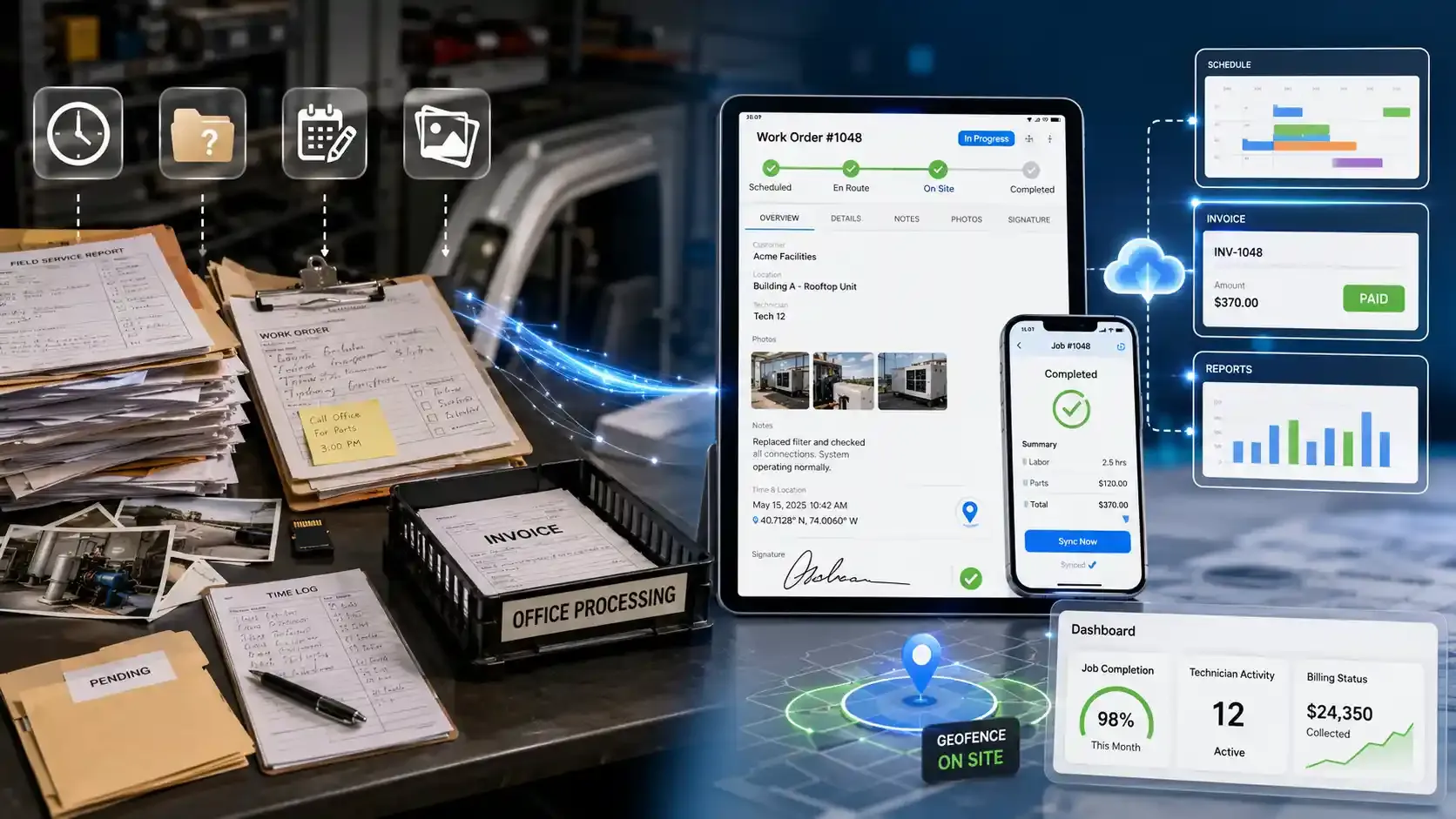
The fastest way to automate field service reporting is a mobile app that captures job details, photos, and signatures on-site, then syncs everything to your office and billing in real time. Here's how paper stacks up against digital in practice.
| Factor | Paper / Manual | Digital (App-Based) |
|---|---|---|
Speed to complete | Slow, often rewritten later | Filled on-site in minutes |
Lost data risk | High | Low (auto-synced) |
Billing turnaround | Days | Same day |
Time/location stamps | Manual, easy to dispute | Automatic (GPS + clock) |
Photo attachment | Separate, often lost | Embedded in the report |
Two field service management software options stand out depending on your team size and daily operations.
FieldServicely
FieldServicely turns the job itself into the report. Instead of filling out a separate form after the work is done, your technician updates the work order from their phone as the job moves forward.
Photos, notes, and job status are uploaded from the field in real time, so the digital field service report builds itself while the work happens. GPS tracking and geofenced attendance stamp arrival and departure automatically. This means labor hours on the timesheet reflect what actually took place on-site.
Once the job wraps up, that data flows into automatic invoicing without anyone re-entering a single field.
Your dashboard shows job completion rates, technician activity, and billing status in one place. The paperless report stops being something your office chases at the end of the week and becomes a byproduct of doing the job.
Microsoft Dynamics 365 Field Service
For larger teams already running inside the Microsoft ecosystem, Dynamics 365 offers field service reporting through its mobile app. Technicians create service reports directly within a booking, capture a digital signature on-site, and save the report to the job timeline. From there, it can be delivered to the customer as a PDF.
The app supports offline access too, so reports sync once connectivity returns. It handles enterprise-scale operations well, though the setup and pricing reflect that scope.
For smaller service businesses that need a paperless field service report app without enterprise overhead, FieldServicely covers the same reporting ground at a fraction of the cost.
Replace manual reporting with a smarter workflow.
Automate reports, timesheets, and invoicing from one app.
The best field service reports are standardized, mobile-friendly, photo-backed, and reviewed regularly. Follow these field service reporting tips to improve documentation quality across your team.
Best practices:
- Use one standard format for every tech for consistency and easier training
- Go mobile and offline-ready so forms sync when the signal returns
- Use specific language: diagnosis, action, result
- Always attach before and after photo evidence
- Capture signatures digitally for legibility and proof
- Spot-check reports weekly for missing fields or vague descriptions
- Sync reports to billing, so invoices go out the same day
Mistakes to avoid:
- Writing reports hours later from memory
- Skipping equipment serial numbers
- Vague descriptions like "fixed" or "looked at it."
- No photos attached
- Reports are stuck on paper with no backup
Conclusion
A field service report is what gets you paid and protects you in a dispute. It builds the equipment history your business depends on. None of that is busywork. Start with the free template above. When paperwork slows your billing down, go digital. Connect your field jobs to billing and stop chasing paperwork. Try FieldServicely free for your service team.
Frequently Asked Questions
Who Fills Out a Field Service Report?
The technician or field worker who performed the job fills it out. It should be completed on-site right after the work is done, while details are still fresh and the customer is available to sign off.
What is the Difference Between a Service Report and An Inspection Report?
A service report documents a completed repair or installation tied to a work order. An inspection report assesses equipment condition or compliance against a safety schedule and logs a pass or fail result.
What Makes a Good Field Service Report Sample?
A strong field service report sample covers job context, customer details, asset data, work narrative, parts tracking, and sign-off with photo fields. If a sample skips any of those, it won't hold up when billing or warranty issues surface.
Can a Field Service Report Be Used as Legal Evidence?
Yes. A signed report with photos, timestamps, and part details serves as documented proof of the work performed. Courts and insurance companies treat these records as credible evidence in liability and warranty disputes.
Do Field Service Reports Help With Insurance Claims?
They do. Insurers look for dated records showing what was serviced, what parts were installed, and whether the customer approved the work. A complete report with photo evidence strengthens your claim significantly.