#1 Field Service Scheduling Software for Free
Keep Every Job On Time
with Field Service Scheduling Software
Plan shifts, assign jobs, and dispatch the right technician faster. Keep your team moving with one field service management and scheduling software.

No Credit Card Required
Instant Access
Easy Upgrade
.webp?2026-04-07T08%3A49%3A36.844Z=&w=3840&q=100)
Trusted by field teams in HVAC, plumbing, electrical, cleaning, construction, and more.
Field Service Scheduling Software for Maximum Efficiency and Profitability

David Reynolds
VP of Service Operations

FieldServicely stands out as a highly effective field service scheduling software. It has helped us improve scheduling efficiency by nearly 40%. The real-time visibility into job status, team availability, and service bottlenecks has significantly improved day-to-day decision-making.
Schedule Jobs in Seconds with a Field Service Scheduling App
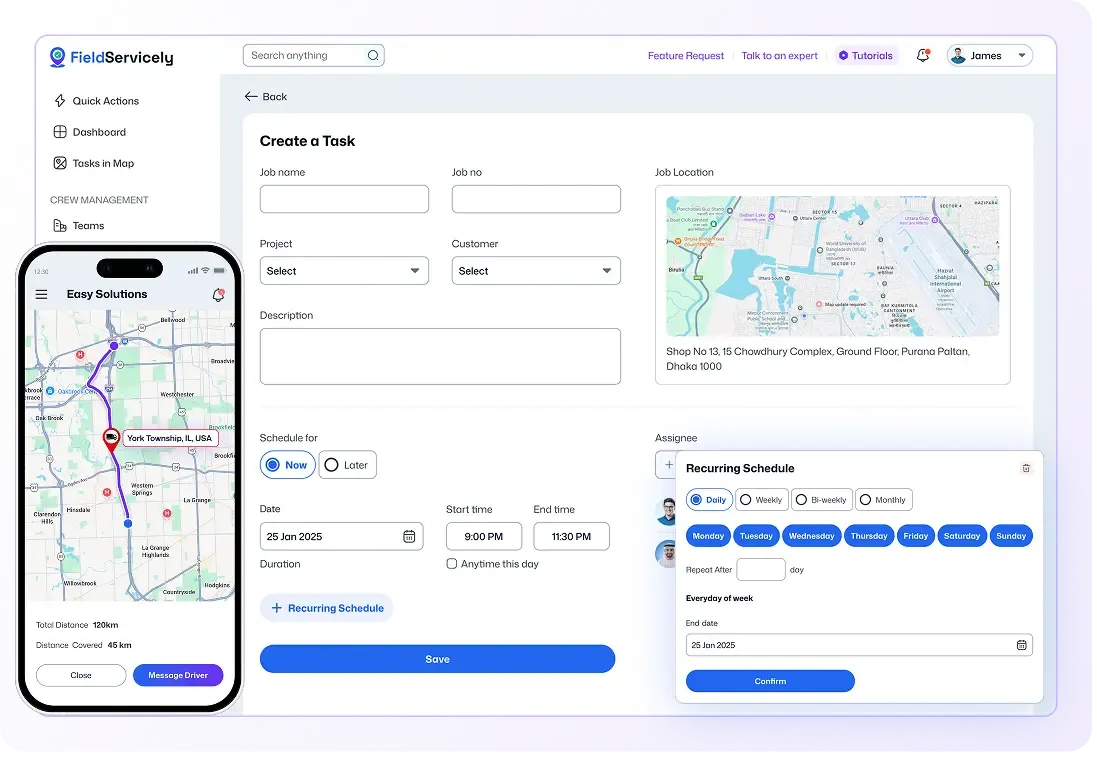
Assign jobs with a simple drag-and-drop scheduler, set recurring work once and let it run automatically, and track every scheduled visit in real time on a live map. This creates less confusion, fewer delays, and more jobs done on time.
Have a Smooth Workflow with Scheduling Software for Field Service
Drag-and-Drop Scheduling
Schedule Jobs and Shifts without Guesswork
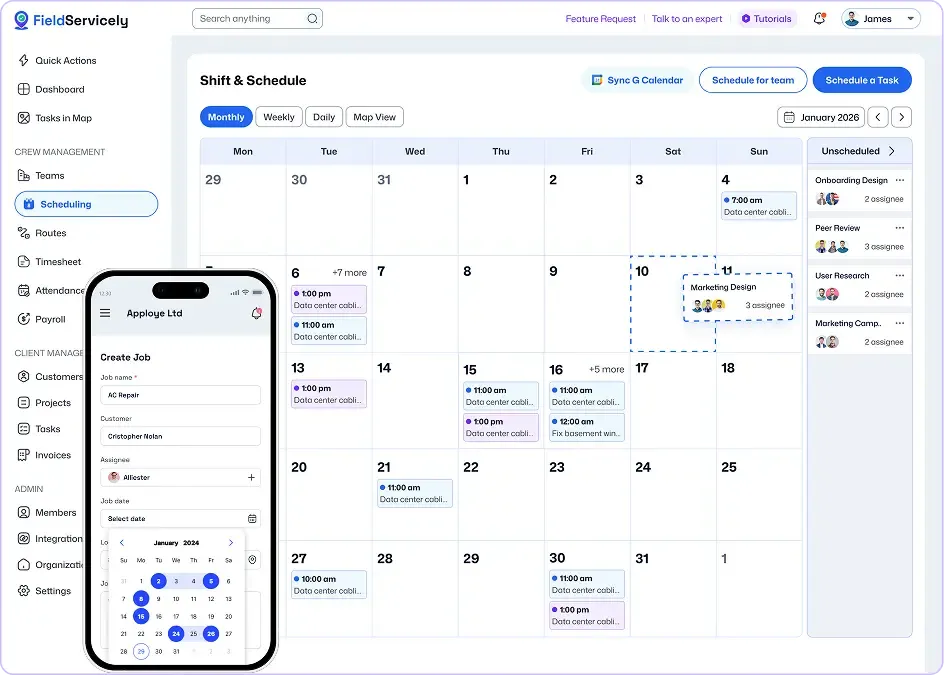
Assign the right job to the right technician based on skill, availability, and location. Just drag and drop to build daily, weekly, or monthly schedules in minutes.
Dispatching
Send the Right Technician to Every Job
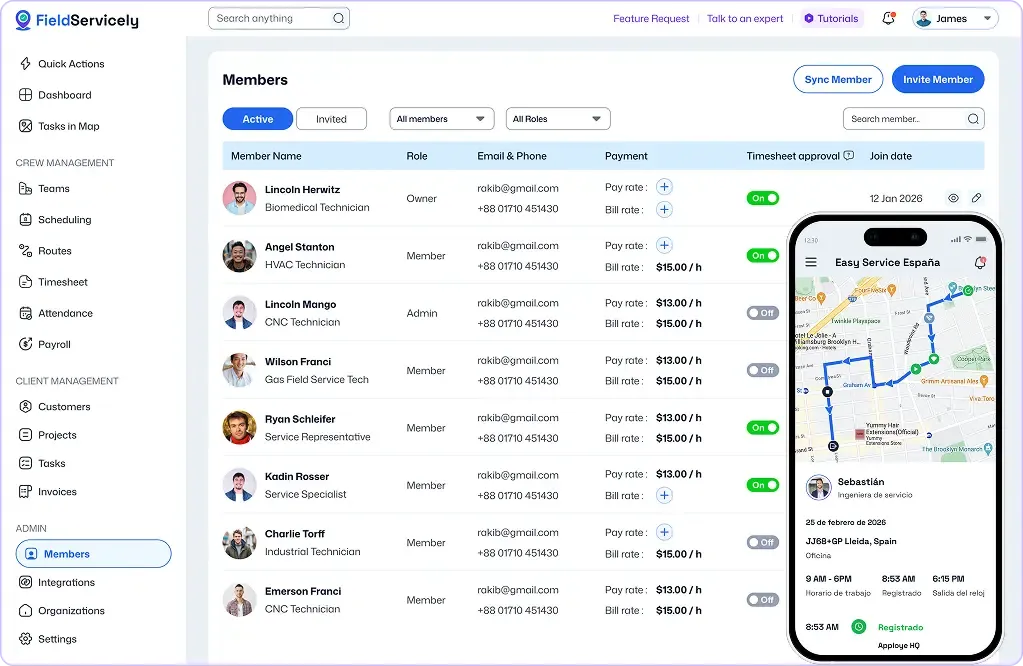
Assign jobs with customer details, site instructions, and service requirements so crews can arrive prepared.
Service Schedule Visualizer
See What’s Planned for the Day Live on the Map
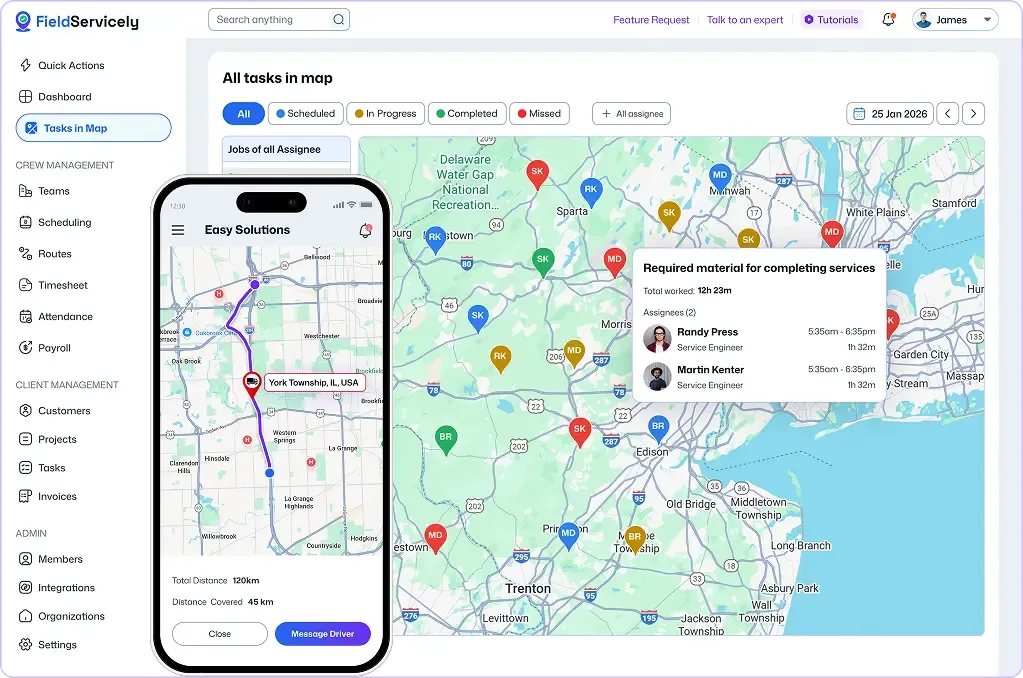
Check the status of all the jobs booked for any day on the Map. It’s a one-of-a-kind location-bound viewable schedule planner that shows real-time progress as work happens.
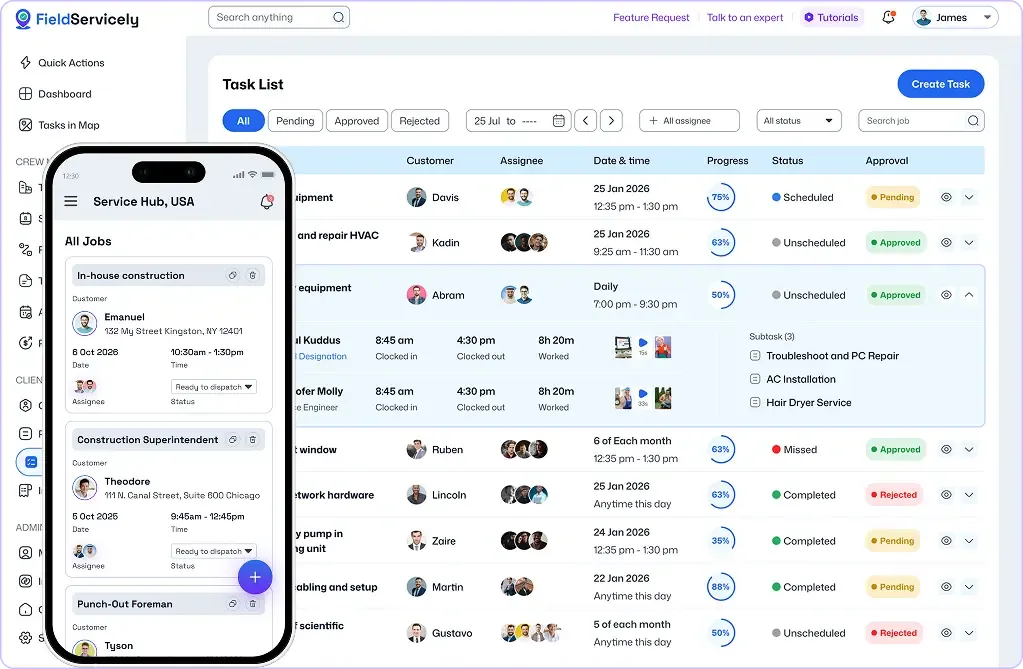
Work Order Management
Turn Work Orders Into Action Instantly
Generate a work order based on customer service requirements. Assign and track progress without losing visibility between the office and the field.
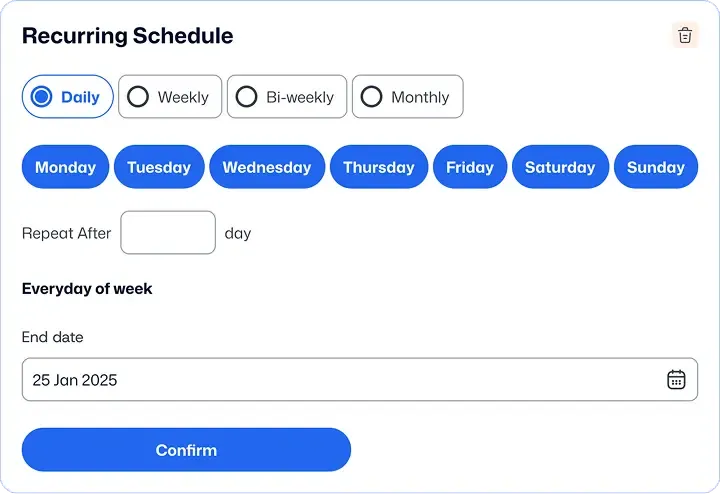
Recurring Job Scheduling
Keep Repeating Jobs Running Like Clockwork
Plan recurring jobs once, and let your schedule stay organized as work repeats over time. So your team avoids missed bookings and stays sharp.
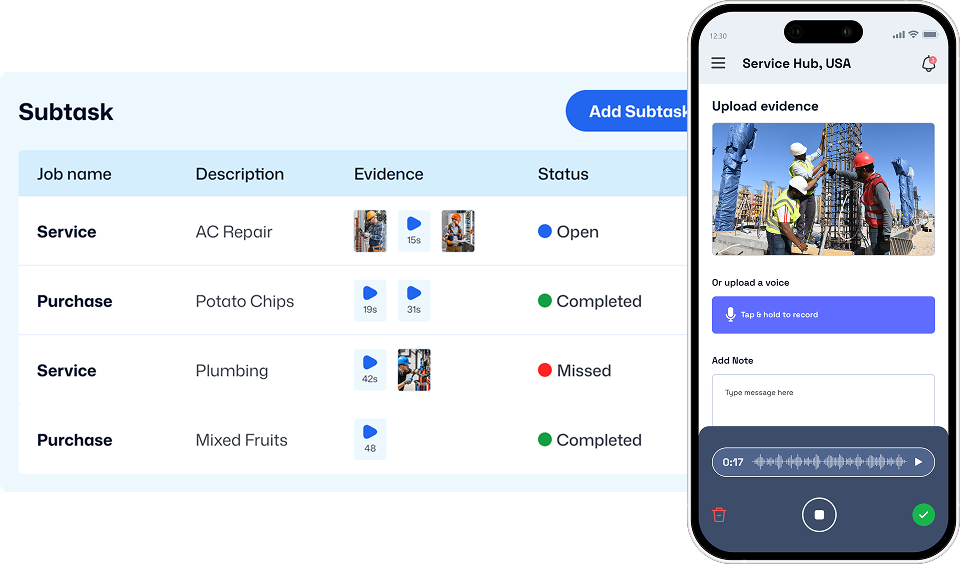
Proof of Work
Keep Crews Accountable Without Micromanaging
Require photo evidence for every completed job. Review whether requirements are met, then approve or reject with one click.
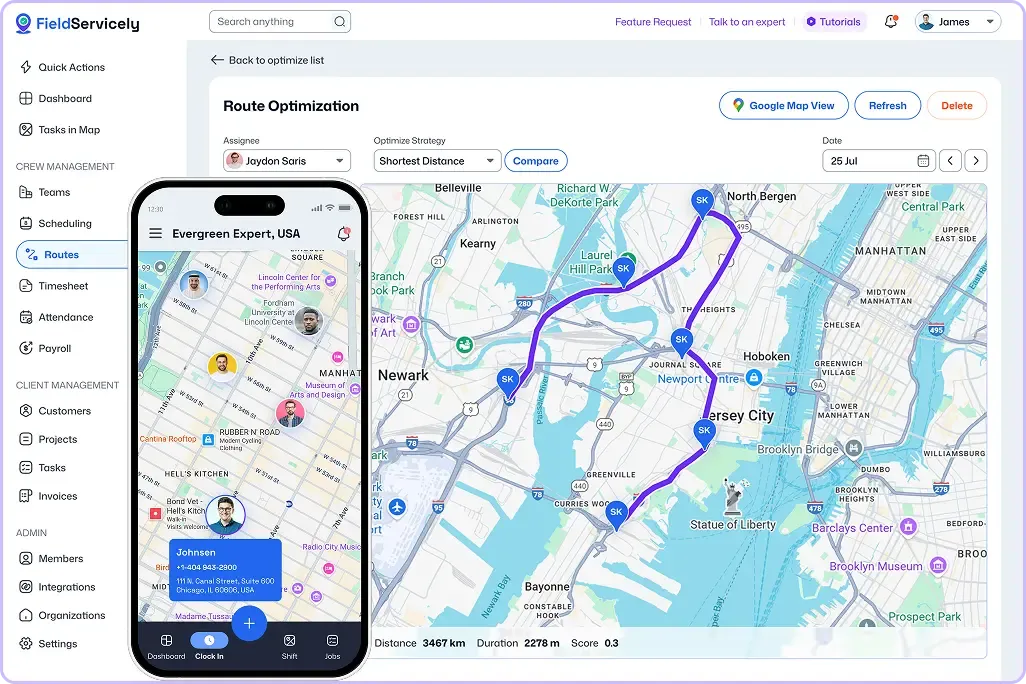
Route Planning and Optimization
Cut Delays with Live Location and Route Visibility
Track field employee movement in real time. Reduce drive time by routing technicians to jobs in the most efficient order as schedules change.

Efficient Service on the Go
Keep Technicians Productive in the Field
Send customer details, job instructions, and location straight to the technicians’ phones so they can complete tasks from anywhere.
Customer stories
Service Teams Use FieldServicely to Schedule Faster and Stay On Track

Mid-market
“Our field management solution will notify technicians when a job is assigned to them.”



Mid-market
“Easily create jobs and select customers with our advanced field service application”

Mid-market
“Team members will submit evidence of job completion. Then, the field service manager can verify images”

Mid-market
“Apploye has proven to be more than a tool - it's a key partner in managing our remote, global team.”

Mid-market
“Create and manage work orders along with billing, budget, and jobs making it an ideal field service system for any business.”
See FieldServicely in Action
Just schedule a demo and see how FieldServicely makes field operations and job management smarter, faster, and easier.
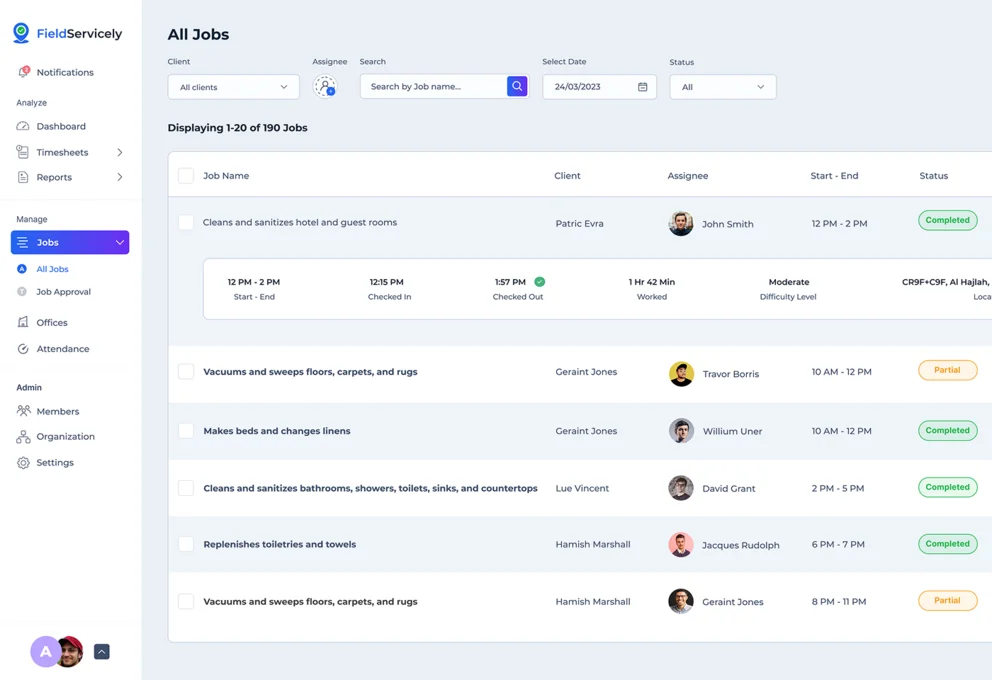
Online Field Service Scheduling Software that Keeps Work Moving
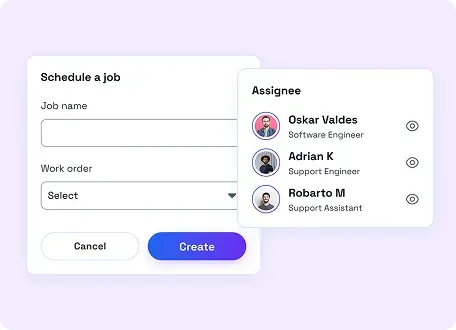
Smart Scheduling
Drag and drop to assign jobs with clear calendar views for daily, weekly, and monthly planning.
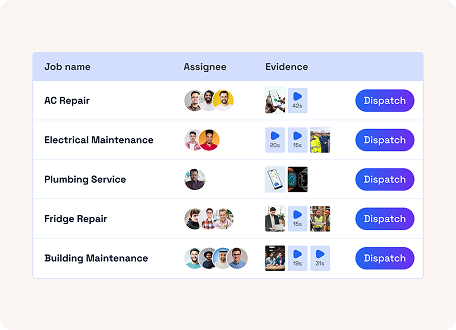
Instant Dispatch
Send job details to the right technician fast and keep every service call moving on time.
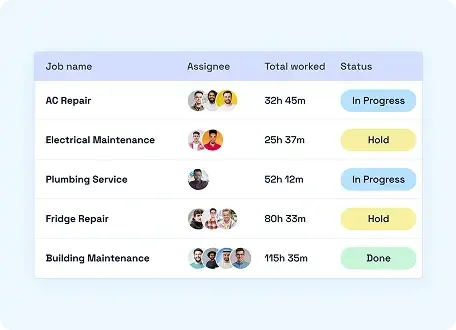
Job Management
Create, assign, update, and complete work orders without losing visibility across teams.
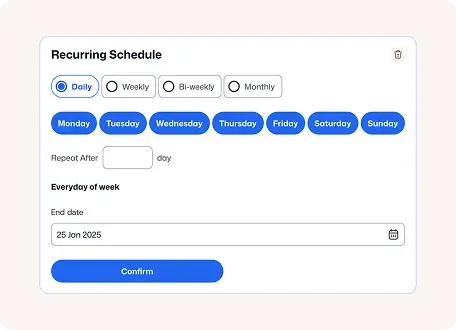
Recurring Schedule
Set up repeat service schedules once and let the system handle every future job
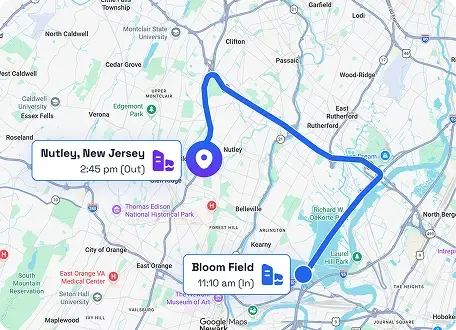
Live GPS Tracking
Track field activity in real time and make faster dispatch decisions as schedules change.
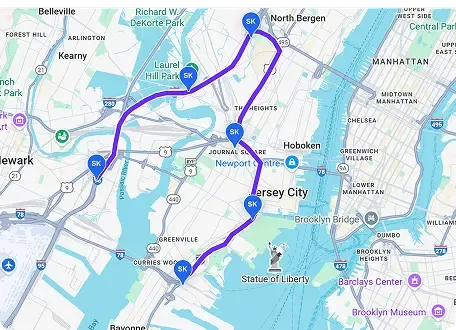
Route Optimization
Reduce drive time and help technicians complete more jobs with better route planning.
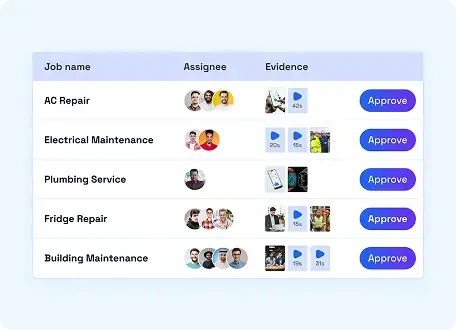
Job Proof and Approvals
Capture photos, notes, and completion updates to review work and approve jobs faster.
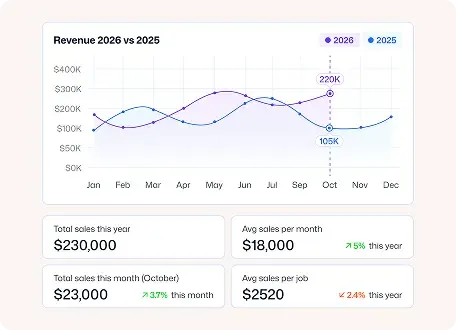
Reporting and Analytics
See job performance, technician productivity, and revenue trends in one dashboard.
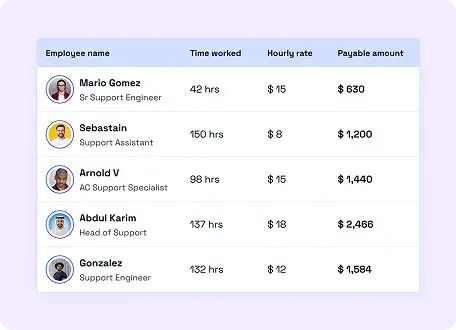
Billing and Payroll Flow
Move from time tracking to payroll and invoicing with less manual admin.
Get Started with Free Field Service Scheduling Software in Minutes
Sign Up & Set Up for Free
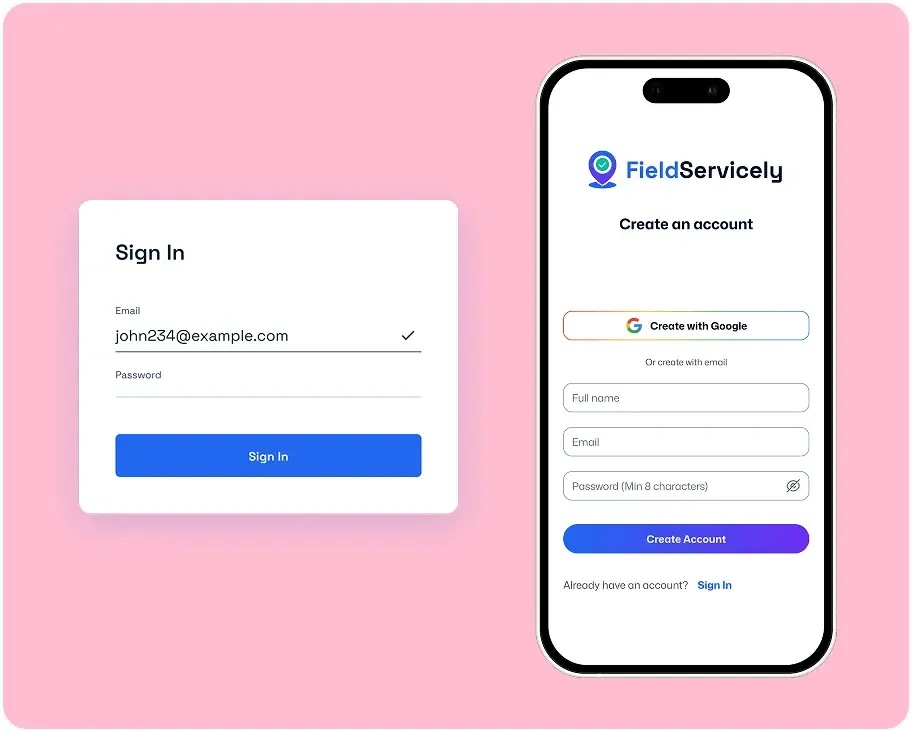
Register a new account with your email and password from the sign-up page. Enter the organization details to get started.
Invite Employees & Create Jobs
Send email invites to your employees and have them download the FieldServicely mobile app.
Create Schedules
Go to the Scheduling tab and make schedules for jobs.
Scheduling Software for Field Service that is Built for Fast-Moving Teams

Sebastian Reed
Business Operations Manager
We mainly use it to manage field operations, scheduling jobs, dispatching teams, tracking attendance, and handling basic invoicing. Before this, we relied more on calls, messages, and separate tools, which made it harder to keep track of everything. FieldServicely helped us bring things into one system, so it’s easier to monitor progress, reduce back-and-forth communication, and keep records organized.
FAQS
Frequently Asked Questions about Field Scheduling Software
Who is field service scheduling software for?
It is built for service businesses that manage on-site jobs, including HVAC, plumbing, electrical, cleaning, landscaping, construction, appliance repair, and similar field teams.
How is field service scheduling software different from field service management software?
Field service scheduling software focuses more narrowly on planning, assigning, and dispatching jobs. Field service management software is broader and may also include work orders, invoicing, payroll, reporting, customer management, and other operational tools.
Can I schedule recurring jobs?
Yes. You can use scheduling software to plan repeat service visits and keep recurring work organized without rebuilding schedules from scratch.
Can dispatchers assign jobs in real time?
Yes. Dispatchers can assign or reassign work as schedules change, helping teams respond faster to urgent jobs or delays.
Can technicians access job details in the field?
Yes. Technicians can view job information, updates, and instructions from the field so they always know where to go and what to do.
Does field service scheduling software help reduce missed appointments?
Yes. It gives your team better visibility into schedules, assignments, and job progress so fewer things fall through the cracks.
Can I track job progress after dispatching?
Yes. Scheduling software helps teams follow jobs from assignment through completion with better visibility for the office.
Will this work for growing service businesses?
Yes. A strong scheduling platform should help both small teams and growing operations manage more jobs without adding scheduling chaos.
Why choose FieldServicely for scheduling and dispatch?
FieldServicely combines scheduling, dispatch, work orders, field updates, and job visibility in one place so your team can move faster with less manual effort.
The Ultimate Guide to Field Service Scheduling Software
The Ultimate Guide to Scheduling App for Field Service
|
FieldServicely
What is Field Service Scheduling Software?
Field service scheduling software is a tool that helps service companies plan and run jobs outside the office. It handles appointment booking, technician assignment, dispatching, route planning, customer updates, and job tracking.
A more complete system is often called field service management and scheduling software. That type of tool does more than schedule work. It can also manage quotes, work orders, invoices, payments, job history, assets, and customer records.
Some buyers search for field service management, scheduling, and dispatch software because they want one platform for the whole service workflow. That makes sense. Scheduling and dispatching work best when they connect to the rest of the business.
You may also see people search for scheduling software for field service or a service scheduling program. Those phrases usually mean the same thing: software that helps service teams stay organized, fast, and profitable.
Why Do Service Businesses Need Scheduling Software?
A service business moves fast, jobs change, customers cancel, emergencies pop up, or technicians run late. This makes paper schedules and basic calendars break down fast.
That is why service scheduling matters so much. Good scheduling reduces wasted time and gives managers better control.
Here is what the right system improves:
- It cuts double-booking.
- It reduces travel time.
- It fills schedule gaps faster.
- It helps dispatchers react to last-minute changes.
- It gives technicians job details before they arrive.
- It keeps customers updated with clear arrival windows.
- It turns a messy day into a clear plan.
A strong field service schedule helps every part of the business. Office staff works with fewer calls. Technicians waste less time. Customers get faster service. Owners get more jobs done in the same day.
How Field Service Scheduling Apps Work
First, the office books a new job. Then the system checks the calendar, technician skill set, location, priority, and availability. After that, the dispatcher assigns the job to the right person. Finally, the technician gets the work order on a mobile device and updates the job in the field.
That is why many companies want field service scheduling and dispatch software instead of a basic calendar app. Scheduling and dispatching must work together. One plans the work. The other sends it out and adjusts it when the day changes.
Some vendors use the term field service scheduling dispatch software. That phrase points to the same core need: schedule jobs fast, dispatch them clearly, and keep the full team in sync.
This process becomes even more valuable when you run a busy team with urgent service calls, recurring maintenance, and multi-stop routes.
The Core Features of a Service Scheduling Software
Not every tool fits every business. Still, the best platforms share a few important features.
1. Smart calendar and drag-and-drop scheduling
A strong calendar gives dispatchers a clear view of all jobs, all technicians, and all open time slots. It should be easy to move work around when schedules change.
This is the heart of field service job scheduling software. If the calendar feels slow or confusing, your team will feel it all day.
2. Mobile access for the field
A good field service scheduling app helps technicians see jobs, customer notes, checklists, directions, and updates from their phone or tablet. They should also be able to mark jobs complete, upload photos, collect signatures, and record parts used.
3. Skill-based assignment
Not every technician can handle every task. Good software matches jobs by training, certification, region, and equipment type.
That matters for teams looking for scheduling software for field technicians, scheduling software for service technicians, and service technician scheduling software. The tool should help the office assign work based on real ability, not guesswork.
4. Route planning and travel reduction
Travel time eats profit. The right system groups jobs by area and suggests efficient routes. That reduces fuel cost, windshield time, and late arrivals.
5. Dispatch board with real-time updates
Real-time visibility helps dispatchers react fast. If a technician finishes early, runs late, or calls out, the office should see it at once and adjust the day.
6. Customer communication tools
Customers want clear updates. Good software sends reminders, “on the way” messages, and status updates automatically. That cuts inbound calls and improves trust.
7. Work orders, invoices, and job history
A scheduling tool becomes more useful when it links to customer records, estimates, invoices, and service history. This is where a simple scheduling tool becomes true field service management and scheduling software.
8. Reporting and job tracking
Managers need reports on team performance, response time, first-time fix rate, completed jobs, no-shows, and revenue per technician.
9. Support for specialized teams
Some businesses need more than basic technician scheduling. They may need engineer scheduling software, field engineer scheduling software, or advanced tools for highly skilled field teams. In those cases, scheduling must account for certifications, equipment, service zones, and job complexity.
10. Call handling and urgent job response
Fast response matters in service businesses. That is why service call scheduling software remains a top need. The system should help your team log calls, assign urgent work, and update customers without delay.
Who Should Use Field Service Scheduling Software?
This software fits any business that sends people out to customer sites.
That includes:
- HVAC
- Plumbing
- Electrical
- Appliance repair
- Pest control
- Locksmith services
- Cleaning services
- IT field support
- Medical equipment service
- Telecom and cable installation
- Security system service
- Property maintenance
- Construction service teams
This is why many buyers search for service industry scheduling software. The core problem is the same across industries: jobs happen in the field, schedules change fast, and the team needs one system to manage the day.
Why is Online Field Service Scheduling Software Now the Standard?
Online field service scheduling software gives teams live access from anywhere. That matters because service work rarely happens from one desk.
Cloud-based tools usually offer these benefits:
- Real-time updates for office and field staff
- Easy access from phones, tablets, and laptops
- Faster deployment
- Lower IT burden
- Better support for remote teams
- Easier integrations with other business tools
Most growing companies now choose online field service scheduling software because it keeps everyone connected in real time. A desktop-only system often slows the team down.
Free Field Service Scheduling Software vs Paid Software
Many small businesses start by searching for free field service scheduling software. That is a practical first step. A free tool can help a small team test digital scheduling before paying for a full platform.
Some vendors also promote a free field service scheduling software plan or trial. That usually gives you basic scheduling, a small user limit, or limited automation.
You may also see the phrase field service scheduling software free in searches from businesses that want to compare tools before making a commitment.
Here is the simple truth:
Free field service scheduling software can work for very small teams with simple needs. It often fails once the business grows.
Free plans usually lack:
- Advanced dispatch tools
- Route optimization
- Strong reporting
- Automation
- Inventory tracking
- Deep integrations
- Multi-user controls
- Custom workflows
That means field service scheduling software free options can help at the start, but paid tools usually make more sense once job volume increases.
Do You Need QuickBooks Integration?
Many service businesses use QuickBooks for accounting. That is why buyers often search for field service scheduling software in QuickBooks.
They usually want to connect scheduling with:
- Estimates
- Invoices
- Payments
- Customer records
- Tax tracking
- Financial reporting
This integration saves time and reduces manual entry. It also helps the office move from booked job to paid invoice without switching between too many systems.
If your team already runs payroll, invoicing, and bookkeeping in QuickBooks, then field service scheduling software QuickBooks integration should sit high on your must-have list.
What the Best Field Service Scheduling Software Should Include
The best field service scheduling software does more than fill a calendar. It helps the whole business run better.
Look for these signs of quality:
- The schedule is easy to read.
- Dispatch changes happen fast.
- Mobile access works well in the field.
- Customer updates go out automatically.
- The system supports recurring jobs.
- Technicians can upload notes, photos, and signatures.
- Reports are easy to understand.
- Integrations work without heavy setup.
- The software scales as your team grows.
The best job scheduling software for field service also helps managers make better decisions. It shows where time is lost, which technicians need support, and how to improve daily efficiency.
The best scheduling software for field service should feel simple for the office and simple for the field. If the tool is hard to use, your team will avoid it.
How to Run a Field Service Job Scheduling Software Comparison
A smart field service job scheduling software comparison starts with your real workflow, not with a vendor’s homepage.
Begin with these questions:
- How many technicians do you schedule each day?
- Do you need recurring service plans?
- Do you dispatch urgent same-day jobs?
- Do technicians need mobile forms and signatures?
- Do you need invoicing and payment collection?
- Do you want route optimization?
- Do you need QuickBooks or CRM integration?
- Do you manage multiple service areas?
- Do you need role-based access for office staff and field staff?
- Do you want customer text updates?
Once you know your needs, compare software in five areas:
Ease of scheduling
This is the first test. The team should be able to book, move, and assign jobs fast.
Mobile experience
The field app should be easy for technicians to use in real work conditions.
Dispatch control
The system should handle changes, emergencies, and same-day updates without confusion.
Business management features
This is where basic calendars fall short. A stronger platform adds work orders, customer history, invoicing, and reports.
Price vs value
The cheapest tool is not always the best fit. Lost time costs money, too. A useful best field service scheduling software comparison should focus on how each tool handles real service work, not just how many features it lists.
How to identify the best fit for your business
The best field service scheduling software for a small local team may not be the right tool for a multi-region company. The best choice depends on your size, workflow, service type, and growth plan.
Here is a simple way to decide:
Choose a simple tool if:
- You have a small team
- You mainly need scheduling and reminders
- Your jobs are short and local
- You want a fast setup
Choose a full platform if:
- You run multiple technicians
- You handle urgent dispatch changes
- You want invoicing and payments in one place
- You need reports and automation
- You plan to grow
This is where terms like best field service scheduling software, best job scheduling software for field service, and best scheduling software for field service become useful. They all point to the same buying decision: find the tool that fits your real work, not just your wish list.
What Problems the Right Software Solves
A strong system fixes common service business problems fast.
It reduces:
- Missed appointments
- Late arrivals
- Empty time slots
- Phone tag between the office and the field
- Double entry
- Last-minute confusion
- Slow invoicing
- Customer frustration
It improves:
- Technician productivity
- Dispatcher control
- Customer communication
- Daily job volume
- First-time fix rates
- Billing speed
- Team accountability
That is why companies move from generic calendars to true field service scheduling software. The gain is not just better scheduling. The gain is better operations.
What to avoid when choosing a platform
Some tools look good in a demo but create problems later.
Be careful with software that:
- Feels hard to navigate
- Lacks a real mobile app
- Does not support dispatch updates
- Cannot handle recurring work
- Offers weak customer communication
- Has poor integration options
- Makes reporting hard to understand
- Charges extra for basic tools you need every day
A weak service schedule software product can create just as much confusion as a spreadsheet. The goal is not just to buy software. The goal is to make daily work easier.
A Simple Buying Checklist
Before you choose a tool, make sure it can handle these needs:
- Job booking
- Technician assignment
- Dispatch updates
- Calendar view
- Mobile access
- Route planning
- Customer reminders
- Work orders
- Invoicing
- Reporting
- Integrations
- Recurring jobs
- Emergency jobs
- Team permissions
If it checks those boxes, you likely have a solid service scheduling program for long-term growth.
Field service scheduling software helps service businesses run faster, stay organized, and give customers a better experience. It turns a messy day into a clear workflow.
The right platform can act as service scheduling software, field scheduling software, field service job scheduling software, and even full field service management and scheduling software in one place. It can also support dispatching, billing, reporting, and technician communication.
If your team handles daily service calls, recurring visits, mobile technicians, or urgent dispatch work, then the right system is no longer optional. It is part of how you grow.
The best choice is the one that fits your team today and still supports your business tomorrow.
