- Field Service Business
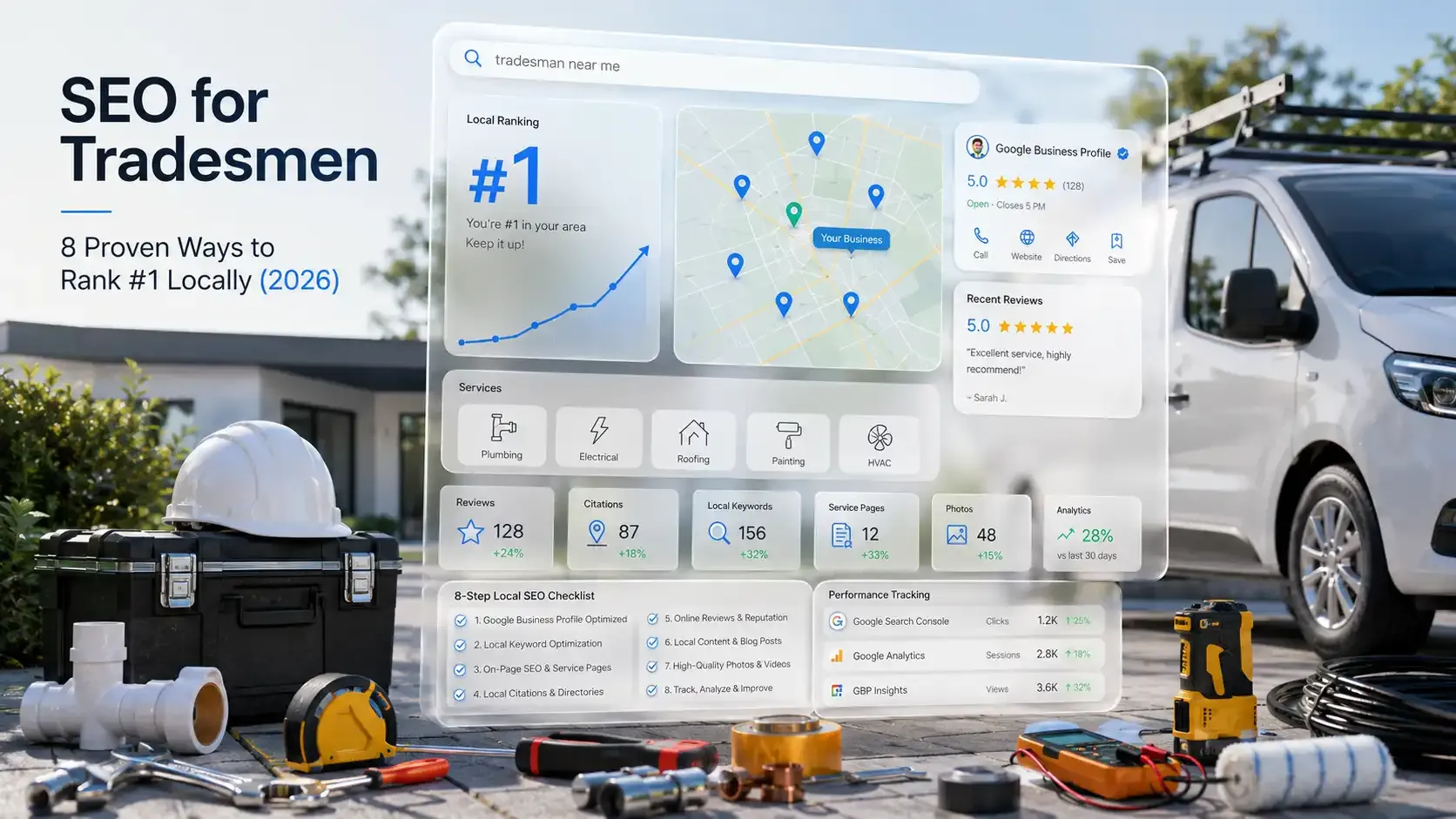
SEO for Tradesmen: 8 Proven Ways to Rank #1 Locally (2026)
Updated on 24 Jun 2026
Jump to
Summary

SEO for tradesmen is how you show up on Google when local customers search for trade services in your area.
A complete Google Business Profile with the right categories, real photos, and weekly posts drives the most local visibility.
Every service and location you cover needs its own page, not one generic "Services" page trying to rank for everything.
Google reviews directly affect your map pack position, and most customers will leave one if you simply ask.
Track your results monthly using Google Search Console, Google Analytics, and GBP Insights, so you know what's working.
76% of people who search "near me" visit a business within 24 hours. That's real foot traffic from a single Google search. SEO for tradesmen is how you make sure your business shows up in that exact moment, not your competitor.
But most tradesmen still rely on word of mouth and hope the phone keeps ringing. Meanwhile, the competition ranks on Google, collects reviews, and books the jobs first.
So how do you close the gap? It’s simpler than you think and comes down to a few steps done in the right order!
In this blog, I break down how to optimize your Google Business Profile and find the right keywords. I will also discuss how to build pages that rank locally, earn more reviews, and track results using free tools.
What Is SEO for Tradesmen and Why Does It Matter?
SEO for tradesmen is the process of optimizing your website and Google Business Profile so people in your area find you when they search for trade services. A homeowner types "plumber near me" or "emergency electrician in Leeds," and your business either shows up or it doesn't.
Regular SEO chases broad keywords and national traffic. Tradesman SEO only cares about your service area and the Google Map Pack, those three business listings that appear above everything else on the results page.
Why does this matter?
Because 97% of consumers now read online reviews when looking for nearby businesses. And 42% of people running a local query click directly on the Map Pack.
If you're not in those top three spots, almost half your potential customers never see you. They pick whoever shows up first, check the reviews, and call.
SEO vs Google Ads: Which One Actually Pays Off for Tradesmen?
| Factor | SEO | Google Ads |
|---|---|---|
Cost over time | Drops as rankings climb | Stays flat every month |
Leads after you stop paying | Keep flowing | Stop the same day |
Customer trust | Higher, organic feels earned | Lower, tagged "Sponsored" |
Time to first results | 3 to 6 months | Same day |
Best use case | Steady long-term leads | Quick seasonal pushes |
SEO won't replace ads overnight. But once your rankings hold, you stop paying for every click.
How to Set Up Google Business Profile for Tradesmen
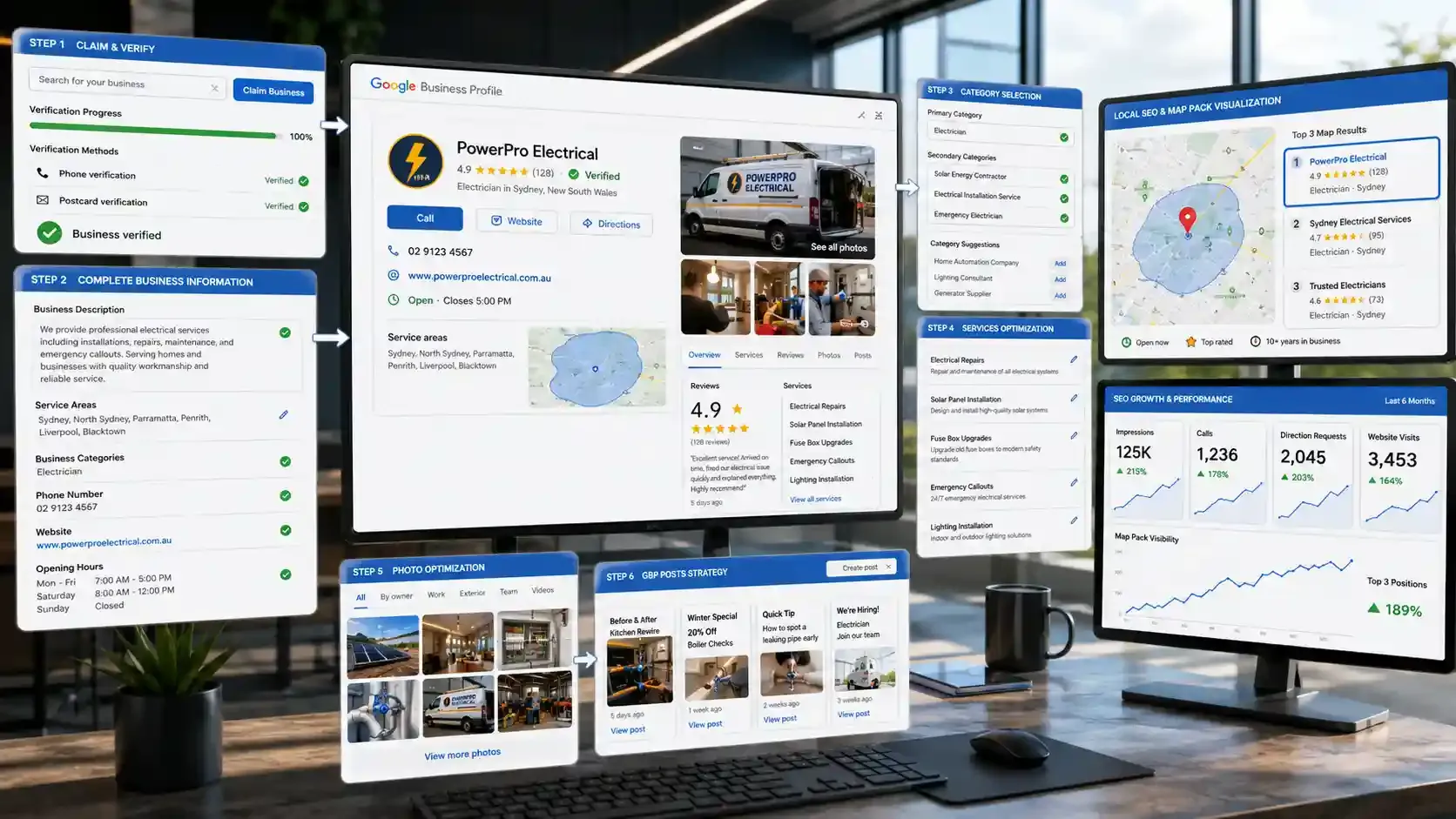
Your Google Business Profile (GBP) controls whether you show up in the Map Pack or stay invisible. Completed profiles earn 7x more clicks than incomplete ones, according to Google's own 2026 data. No other single change will move the needle this fast for a tradesman.
But most tradesmen either skip steps or pick the wrong settings. Here's how to do it right.
How to Claim Your Google Business Profile
- Go to Google Business Profile and sign in with your business Google account.
- Search for your business name. If it exists, claim it. If not, create a new profile.
- Pick your primary business category (more on this below).
- Add your service areas, phone number, website, and working hours.
- Verify through the method Google offers, usually a phone call or a postcard.
Verification alone won't do much. The optimization after it is what counts.
What to Include in Your Google Business Profile
- Business description: Write 750+ characters using keywords your customers actually search. Profiles with descriptions over 750 characters get 2.5x more impressions.
- Photos of real work: Not stock images. Upload completed jobs, your van, and your team on site. Businesses with photos receive 42% more direction requests than those without.
- Services list: Add every service you offer individually. This filters out irrelevant enquiries and helps Google match your profile to the right searches.
- Operating hours: Keep these current. Profiles with updated hours get 2x more visits than those with missing or outdated info.
How to Choose the Right GBP Category
Your primary category tells Google what type of business you run. 86% of all GBP impressions come from category-based searches like "plumber near me" or "electrician open now," not from people typing your business name.
So if you're an electrician who also does solar panel installation, don't just choose "Electrician." Set that as your primary category, then add "Solar Energy Contractor" as a secondary one.
Common mistakes I see tradesmen make with categories:
- Choosing "Construction Company" when "General Contractor" or a specific trade category fits better.
- Skipping secondary categories entirely.
- Selecting broad categories like "Home Improvement" instead of "Bathroom Remodeler" or "Kitchen Remodeler."
Google allows up to 10 categories. Use them. Each one opens a new set of searches where your profile can appear.
Do Google Business Profile Posts Help SEO?
GBP profiles with regular posts appear 3.1x more often in the top 3 map results. That's a massive advantage for something that takes five minutes.
What to post:
- Before-and-after photos from recent jobs.
- Seasonal offers like boiler servicing before winter.
- Quick tips homeowners can use, such as "how to spot a leaking pipe early."
These posts signal to Google that your business is active and engaged. They also give potential customers a reason to pick you over a profile that looks abandoned.
Your profile brings the calls, but who's managing the bookings?
Assign jobs and dispatch techs in real time with FieldServicely
How to Do Keyword Research for a Trade Business
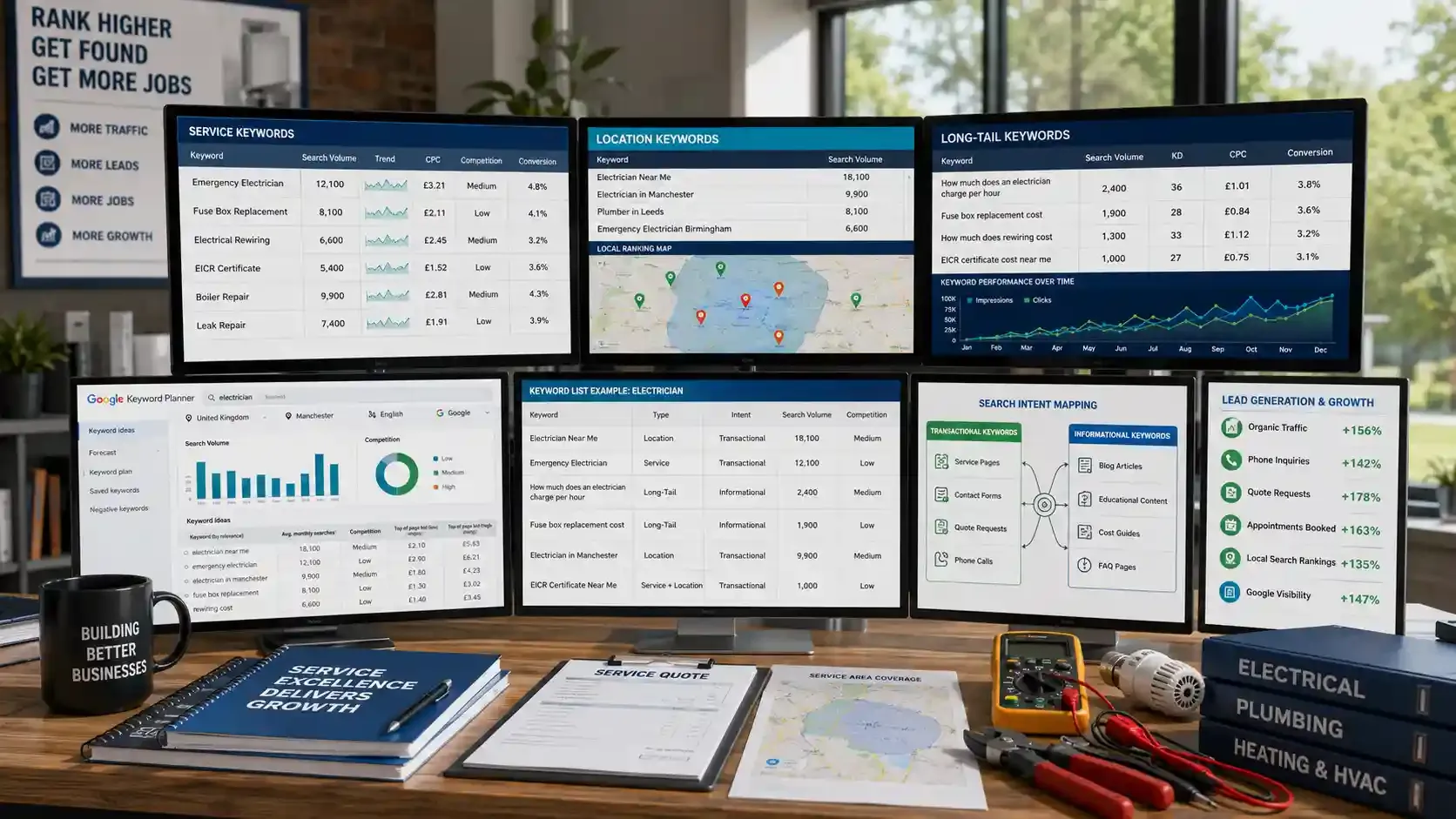
Keyword research shows you the exact phrases your customers type into Google before they pick up the phone. Skip this step, and every page on your site becomes a guess.
Tradesmen need three types of keywords:
- Service keywords describe what you do: "boiler repair," "fuse box replacement," "emergency leak fix."
- Location keywords tie your service to an area: "plumber in Leeds," "electrician in Birmingham."
- Long-tail keywords are specific phrases people search when they're close to booking: "how much does a rewire cost USA." A study found that six-word search queries convert at 1.94%, while single-word terms convert at just 0.17%.
Free Keyword Research Tools for Tradesmen
You don't need expensive tools to start. Open Google Keyword Planner (free with a Google Ads account) and follow this:
- Type in your main service, like "electrician."
- Filter by your country or city.
- Sort results by monthly search volume.
- Write down every term that matches what you actually offer.
- Check the "competition" column. Low or medium-competition keywords are your quickest wins.
You can also use Ubersuggest for related keywords and question-based phrases. Or simply type your service into Google and scroll to the bottom for "Related searches." Those suggestions come straight from real user queries.
Keyword List Example: Electrician
Here's what a basic keyword research list looks like for an electrician:
| Keyword | Type | Intent |
|---|---|---|
Location | Transactional | |
Emergency electrician | Service | Transactional |
How much does an electrician charge per hour | Long-tail | Informational |
Fuse box replacement cost | Long-tail | Informational |
Electrician in Manchester | Location | Transactional |
EICR certificate near me | Service + Location | Transactional |
Match Content to Search Intent
Transactional keywords like "electrician near me" belong on your service pages. Informational keywords like "how much does rewiring cost" belong on blog posts. Mix these up, and Google won't rank either page.
The right keywords fill your calendar fast
Stay organized with FieldServicely's scheduling and work orders
How to Create Service Pages That Rank Locally
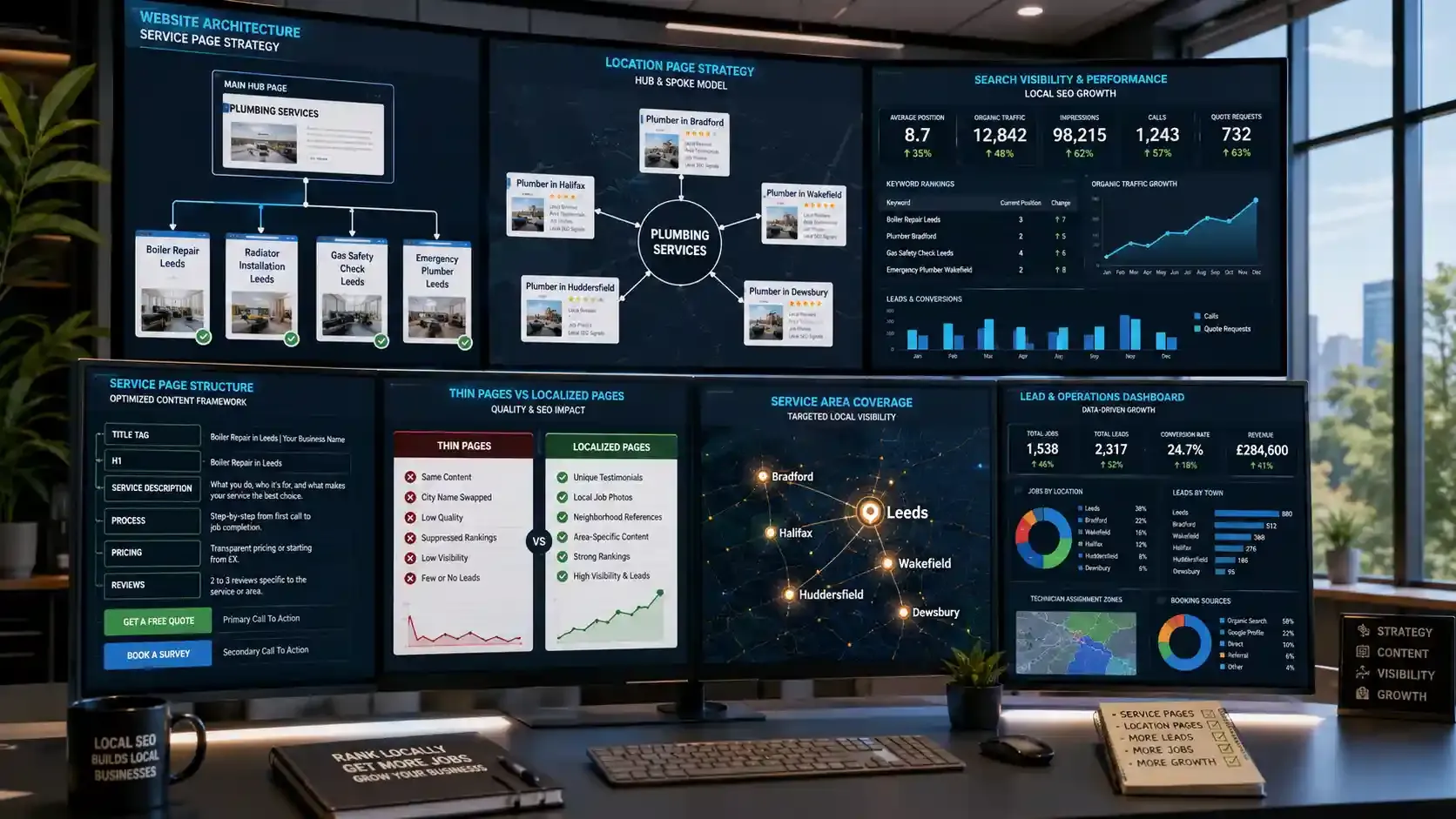
One "Services" page listing everything you do won't rank for anything specific. Google needs a clear focus to rank a page, and a single page targeting "boiler repair," "radiator installation," and "gas safety check" at once gives it none.
That's why Whitespark's 2026 ranking factors survey placed "dedicated page for each service" as the #1 factor for local organic rankings.
The reason is simple. Each term carries a different search intent, so each one needs its own page.
The same logic applies to locations. Your Google Business Profile only ranks you within roughly 10 to 15 miles of your listed address. If you serve Bradford but your office is in Leeds, a page at /plumber-in-bradford/ gives Google a reason to show you in Bradford searches.
Best Service Page Structure for Local SEO
- Title tag: Boiler Repair in Leeds | [Your Business Name]
- H1: One clear heading matching the service and location.
- Service description: What you do, who it's for, what sets your work apart.
- Your process: Step-by-step from first call to job completion.
- Pricing indication: Even "starting from £X" builds trust.
- CTA: "Get a Free Quote" or "Book a Survey."
- Reviews: 2 to 3 reviews specific to that service or area.
How to Create Location Pages Without Duplicate Content
Entrepreneur's 2026 multi-location SEO guide warns that pages with only the city name swapped get suppressed by Google's quality systems.
Use a hub-and-spoke structure. Your main page (/plumbing-services/) is the hub. Location pages like /plumber-in-bradford/, and /plumber-in-wakefield/ are spokes.
Each spoke links back to the hub, and every spoke gets localized with neighborhood references, job photos from that area, and a customer testimonial from that town.
Don't build 50 thin pages. Build 5 to 10 strong ones for the areas where you actually want more work. Once those pages start pulling in leads from different towns, keeping track of which area each job came from gets messy fast.
That's where a tool like FieldServicely helps. You can tag jobs by service area, assign technicians based on location, and see exactly which pages are driving real bookings, not just traffic.
Leads from multiple locations get messy without the right system
Tag and track every job by service area with FieldServicely
How to Get More Google Reviews as a Tradesman
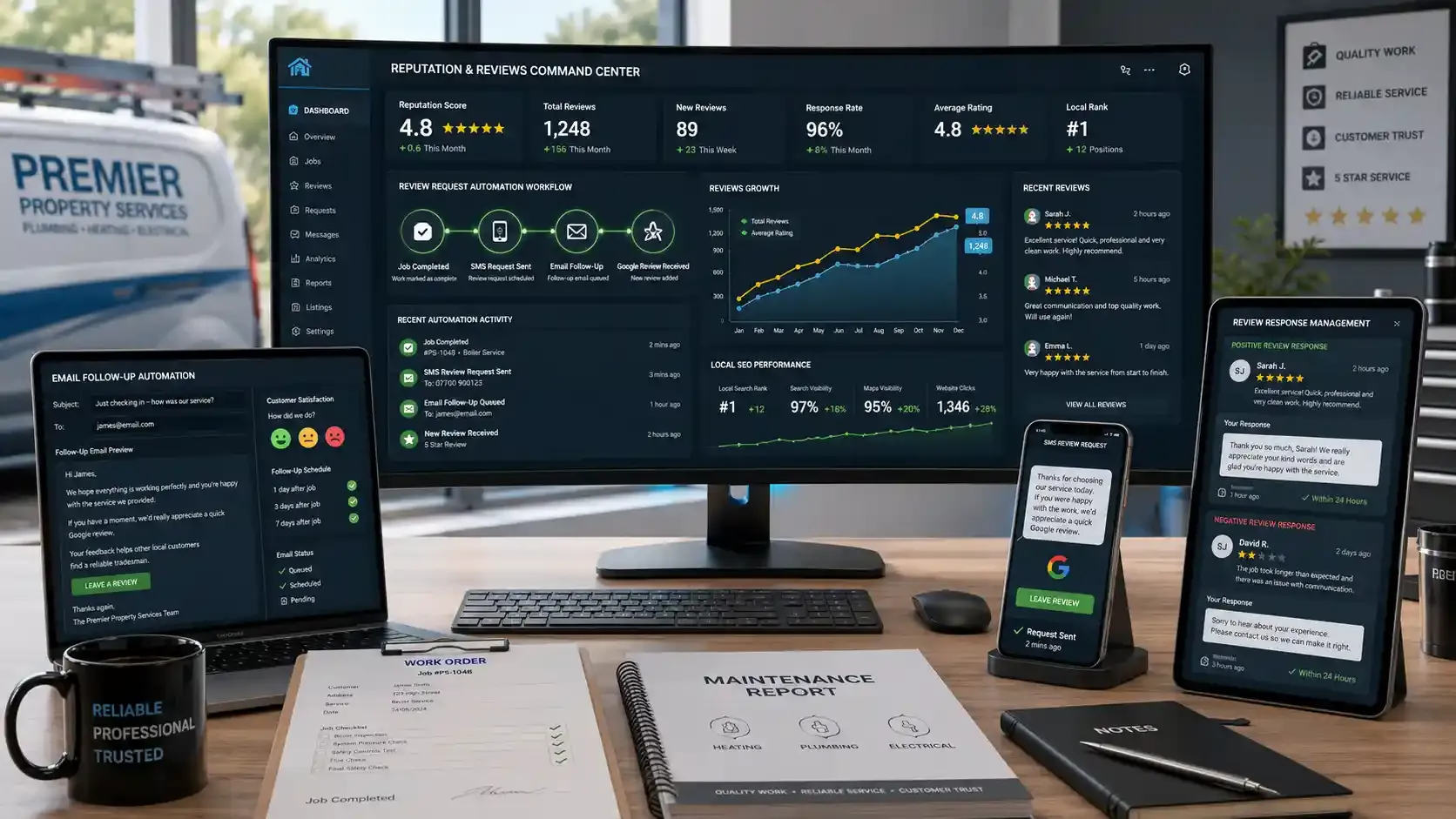
Online reviews are one of the top three local SEO ranking factors in 2026, right alongside your Google Business Profile signals and on-page content. Forbes reports that businesses with more than nine recent reviews generate 52% more revenue than average.
The problem? Most tradesmen finish a job, move to the next one, and never ask for a review. Meanwhile, 83% of customers will actually leave one if you simply ask.
Here are two ready-to-use templates you can start sending today.
SMS Template (Send Right After the Job)
Hi [First Name], thanks for choosing [Your Business Name] today! If you're happy with the work, a quick Google review would mean a lot: [Your Google Review Link]. Takes 30 seconds. Cheers, [Your Name]
Email Template (Send 24 Hours Later)
Subject: How did we do, [First Name]?
Hi [First Name],
Just checking in after yesterday's [service type]. If everything looks good, I'd really appreciate a short review on Google. It helps other homeowners in [area] find reliable tradesmen.
[Leave a Review button/link]
Thanks again for trusting us with the job.
[Your Name], [Business Name]
If you use FieldServicely to manage your jobs, you already know when each job wraps up. That's the perfect trigger to fire off a review request while the customer still remembers the experience.
How to Handle Negative Reviews
Don't ignore them. And don't argue. Respond within 24 hours, acknowledge the issue, and offer to fix it offline. Something like:
"Hi [Name], sorry to hear about this. That's not the standard we aim for. I'd like to make it right. Could you call us at [phone] so we can sort this out?"
This shows future customers that you take problems seriously. In fact, 56% of consumers say they've changed their mind about a business based purely on how it responded to a negative review.
The best time to ask for a review is right after the job wraps up
Track your job completion so you never miss the window
On-Page SEO Checklist for Tradesmen
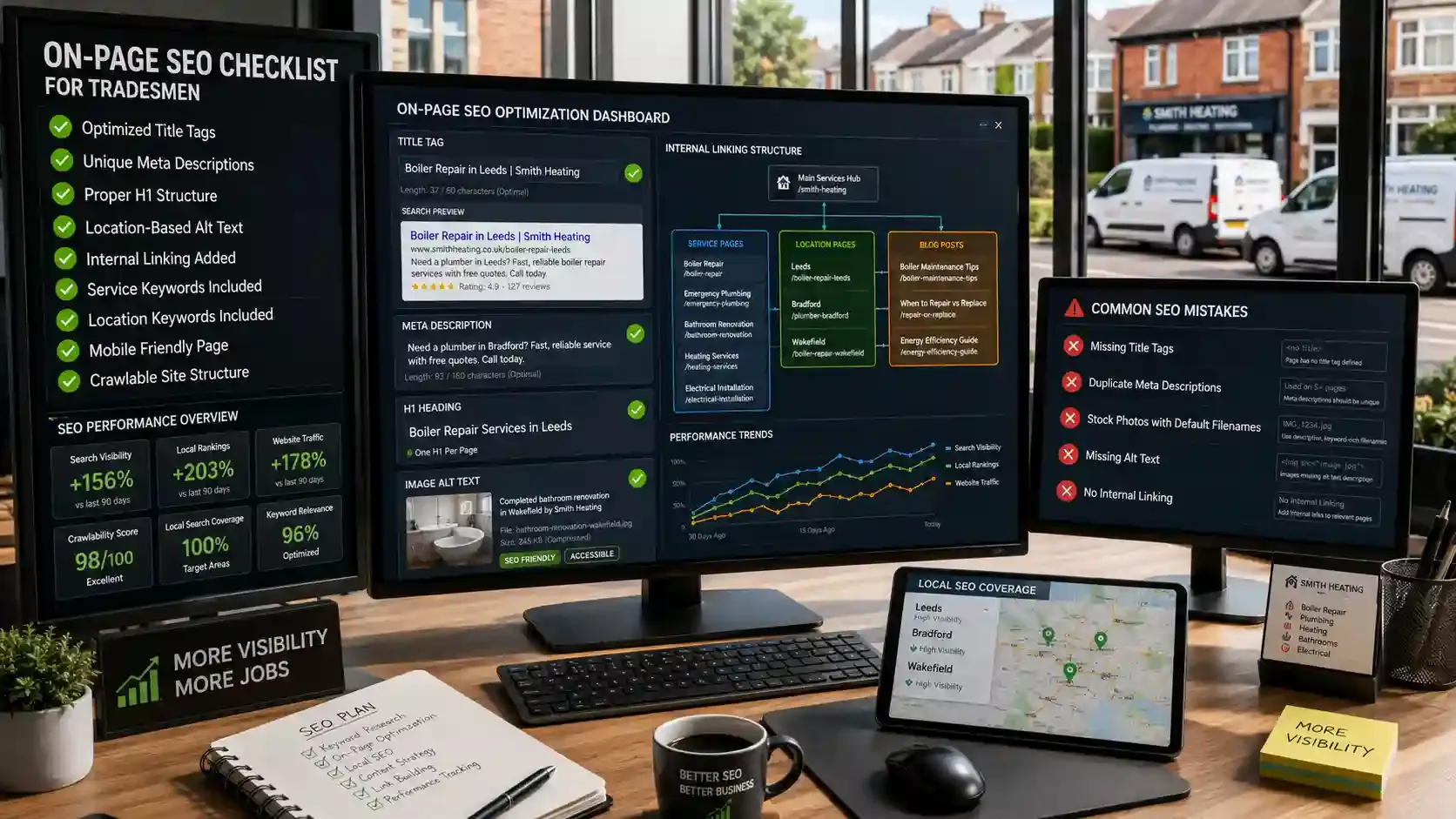
On-page optimization makes sure every page on your site tells Google exactly what you do and where you do it. Most tradesman websites get this wrong in basic ways. Here's a quick checklist to fix that.
- Title tags: Follow this format: [Service] in [Location] | [Business Name]. Example: Boiler Repair in Leeds | Smith Heating. Google's SEO Starter Guide confirms that title tags are one of the strongest signals for understanding page content.
- Meta descriptions: Keep them under 155 characters. Include your primary keyword and a clear call to action. Example: Need a plumber in Bradford? Fast, reliable service with free quotes. Call today.
- H1 heading: One per page. It should match the main keyword that the page targets. Don't stuff two or three services into a single H1.
- Image alt text: Describe the image and include the location. Instead of "IMG_3847.jpg," write "completed bathroom renovation in Wakefield by [Business Name]."
- Internal links: Link your service pages to related blog posts and connect location pages back to your main services hub. This helps Google crawl your site faster and spreads domain authority across pages.
Mistakes I See on Almost Every Tradesman's Website
- Pages with no title tag at all, so Google writes one for you (and it's usually terrible).
- The same meta description is copied across every page, or none at all.
- Stock photos with default filenames and zero alt text.
- No internal linking between pages, leaving Google to guess how your site connects.
Less time on admin means more time improving your website
Automate timesheets and payroll with FieldServicely
Technical SEO Checklist for Trade Websites

Technical SEO makes sure Google can actually find, crawl, and index your website without running into errors. Your content and keywords won't matter if search engines can't access your pages in the first place.
The good news is you don't need a developer to check the basics. This 15-minute audit covers the seven things that trip up most tradesmen's websites.
7-Point Technical SEO Checklist
- Is your site on HTTPS? Check for the lock icon in your browser bar. If it's missing, ask your hosting provider to install an SSL certificate. Google confirmed HTTPS as a ranking signal back in 2014, and it still applies.
- Does it load in under 3 seconds? Run your homepage through Google PageSpeed Insights. Anything above 3 seconds costs you visitors, especially on mobile.
- Is it mobile-friendly? Over 60% of local searches happen on phones. Test yours at Google's Mobile-Friendly Test.
- Do you have a sitemap in Google Search Console? A sitemap tells Google which pages exist on your site. Submit one through Google Search Console under the "Sitemaps" tab.
- Any broken links? Dead pages frustrate visitors and waste Google's crawl budget. Run a free check at Broken Link Checker.
- Is your robots.txt blocking important pages? Visit yourdomain.com/robots.txt and make sure it's not accidentally telling Google to skip your service or location pages.
- Do you have schema markup? This is the one most tradesmen skip entirely.
What Is Schema Markup for Local Businesses?
Schema markup is a small piece of code you add to your site that tells Google specific details about your business in a structured format. For tradesmen, two types matter most: LocalBusiness schema and FAQ schema.
LocalBusiness schema feeds Google your business name, address, phone number, opening hours, and service area in a way it can read instantly. FAQ schema turns your frequently asked questions into rich results that show directly in search, giving you more space on the results page than competitors.
Google's own structured data documentation walks through exactly how to add both. If you're on WordPress, plugins like Rank Math or Yoast handle this without touching code.
Your tools should handle the busywork so you don't have to
Auto-track hours and generate invoices with FieldServicely
How to Build Backlinks for a Local Trade Business
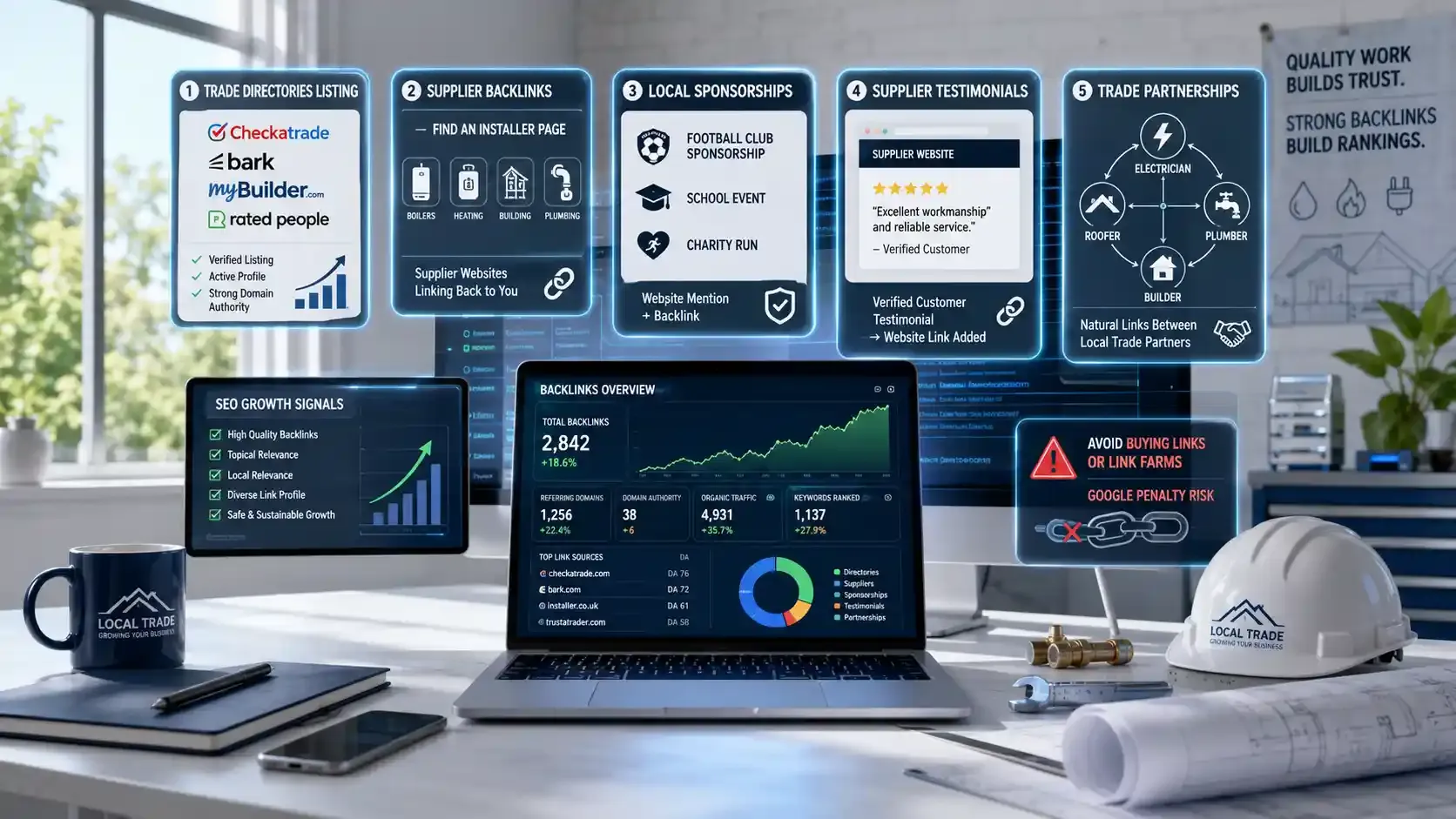
Backlinks are links from other websites pointing to yours. They signal to Google that your site is trustworthy and worth ranking. But for tradesmen, the usual "write guest posts" advice doesn't apply. You're running a trade business, not a blog.
Here are five strategies that actually work.
Best Backlink Strategies for Local Tradesmen
- Get listed on trade directories. Checkatrade, Bark, MyBuilder, and Rated People all carry strong domain authority and link back to your website.
- Ask suppliers for a link. If you're an approved installer for a boiler brand or certified dealer, ask them to add you to their "Find an Installer" page.
- Sponsor something local. A football club, school event, or charity run will usually list sponsors on its website with a link back. One small sponsorship gets you a backlink, a brand mention, and local goodwill.
- Write a supplier testimonial. Many suppliers display customer testimonials on their site with a link. Send a genuine review, and the backlink follows.
- Partner with complementary tradesmen. An electrician links to a trusted plumber. A roofer links to a reliable builder. Google sees these as natural connections between related local businesses.
But avoid buying links, joining link farms, or submitting to random, unrelated directories. Google penalizes all three. (Source: Google Spam Policies)
How to Optimize for AI Overviews and Voice Search
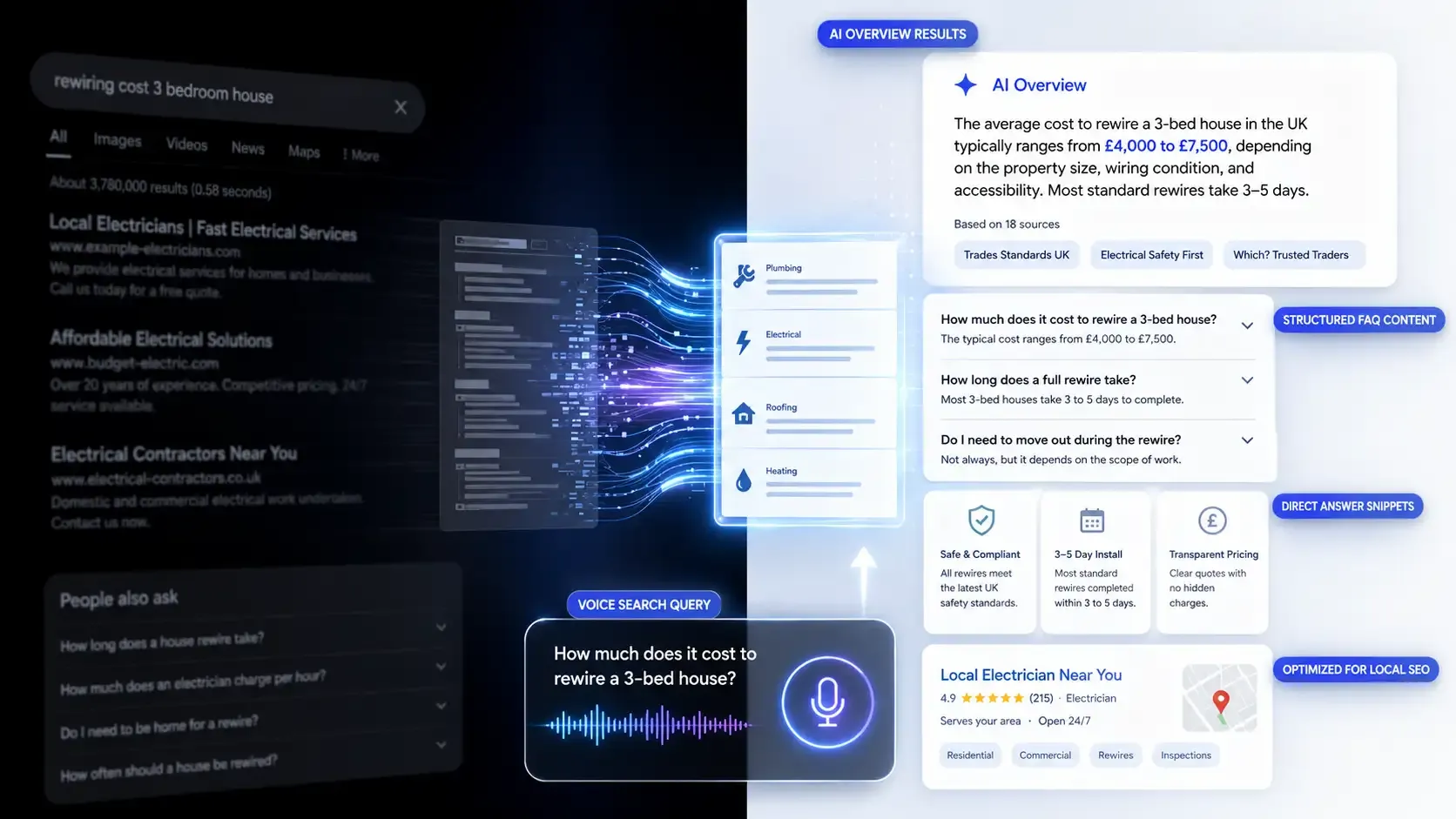
Google's AI Overviews now answer trade-related questions directly at the top of search results. AI Overviews appeared for 68% of local searches in 2025, often above both the map pack and organic listings.
If your content is clear and structured, Google pulls from it. If it's vague, someone else gets cited.
How to Get Featured in Google AI Overviews
- Answer questions directly. Start each section with a straight answer in the first sentence. AI models grab content that's easy to parse.
- Add FAQ sections to service pages. Use real customer questions and answer in two to three plain sentences.
- Use FAQ schema markup. This tells Google your page contains structured Q&A, making it eligible for rich results and AI citations.
How Does Voice Search Affect Local SEO?
People don't type on voice assistants. They talk. "Hey Google, find me an emergency plumber near me" is a full conversational query.
In fact, 76% of smart speaker users now run local voice searches at least weekly.
To capture these, write in natural language using long-tail keywords that match how people speak. "How much does it cost to rewire a 3-bed house?" is exactly the kind of query voice assistants pull answers from.
More visibility means more inbound calls to manage
Handle every enquiry with FieldServicely's scheduling and dispatch
Best Free SEO Tools for Tradesmen
You can't improve what you don't measure. And the good news? Three free Google tools tell you everything you need to know about your SEO performance.
Start with Google Search Console. It shows which keywords bring up your site, how many impressions and clicks each one gets, and flags indexing errors that might be hiding your pages from search results.
Once you know what's driving traffic, Google Analytics tells you what happens next. You can see which pages get the most visits, where your organic traffic comes from, and whether visitors actually call or fill out a quote form.
Then there's Google Business Profile Insights, which covers the local side. It tracks how many people viewed your profile, tapped for directions, or called you straight from the map pack. If your GBP isn't generating calls, you'll see it here first.
What to Check Every Month
| Metric | Tool | What It Tells You |
|---|---|---|
Organic traffic | Google Analytics | How many people find you through Google |
Keyword rankings | Search Console | Which terms does your site show up for |
Clicks and impressions | Search Console | Whether your visibility is growing or dropping |
Phone calls from GBP | GBP Insights | Direct leads from your profile |
Page speed | PageSpeed Insights | Performance issues slowing your site down |
Block 20 minutes once a month to review these numbers. That's enough to spot what's working and catch problems before they start costing you leads.
How Much Does SEO Cost for Tradesmen in 2026?
DIY SEO for tradesmen costs nothing if you handle it yourself using the free tools covered above. Hiring professional help ranges from $300 to $5,000+ per month, depending on competition and scope.
Here's how the pricing breaks down in 2026:
| Approach | Monthly Cost | Best For |
|---|---|---|
DIY (free tools + your time) | $0 | Sole traders with spare time |
Freelancer | $500 – $1,500 | Basic optimization and fixes |
Local SEO agency | $800 – $2,500 | Ongoing strategy and execution |
Competitive/Multi-location agency | $2,500 – $5,000+ | High-competition markets |
The average monthly retainer sits between $1,000 and $2,500, whereas starter packages for low-competition markets begin around $300 to $800 per month.
So where should you start?
If you're a one-person operation, handle the basics yourself: claim your Google Business Profile, build service pages, collect reviews, and fix your on-page SEO. That alone puts you ahead of most competitors.
Once leads start flowing and your time becomes the bottleneck, that's when outside help makes sense.
Mistakes When Choosing an SEO Agency
- Guarantee #1 rankings. No one controls Google's algorithm.
- Lock you into long contracts before showing results.
- Refuse to share reports or explain their process.
- Can't show results from other trade businesses they've worked with.
Cut admin costs so you can invest where it counts
FieldServicely's free plan includes scheduling, GPS, and work orders
Conclusion
Look, none of this is complicated. But most tradesmen never get around to it. They keep relying on referrals and wondering why the phone slows down every few months.
Pick one section from this guide and do it this week. Claim your profile. Fix a title tag. Send a review request after your next job. That's all it takes to start.
The work adds up. And once it does, Google sends you customers while you're out on a job.
SEO for Tradesmen FAQs
How Long Does SEO Take to Work for a Tradesman?
Most tradesmen start seeing real movement in 3 to 6 months. Competitive areas take longer. The key is consistency, not speed. Google rewards websites that improve steadily, not ones that change everything once and then stop.
Do Tradesmen Need a Website for SEO?
Yes. Your Google Business Profile helps with the map pack, but it can't rank for every service and location you cover. A website with dedicated pages gives Google more reasons to show your business across different searches.
Does Social Media Help With SEO for Tradesmen?
Social media doesn't directly affect Google rankings. But it drives traffic to your website, builds brand awareness, and helps potential customers trust you before they search. That trust often turns into branded searches and more clicks on your listing.
How Often Should a Tradesman Update Their Website?
At minimum, once a month. Add a new blog post, update your service pages with recent job photos, or refresh outdated pricing. Google favors websites that show regular activity over ones that sit untouched for months.
Is SEO Worth It for a One-Person Trade Business?
Absolutely. Solo tradesmen benefit the most because every new lead matters. Even basic steps like claiming your profile, collecting a few reviews, and building 3 to 5 service pages can fill gaps in your calendar without spending on ads.
What to read next