SEO for Small Business: Step-by-Step Guide to Rank in 2026
Updated on 26 Jun 2026
Jump to
Summary

SEO for a small business means optimizing your website so customers find you on Google without paying for ads.
Start with Google Search Console, Google Analytics, and a fully optimized Google Business Profile before anything else.
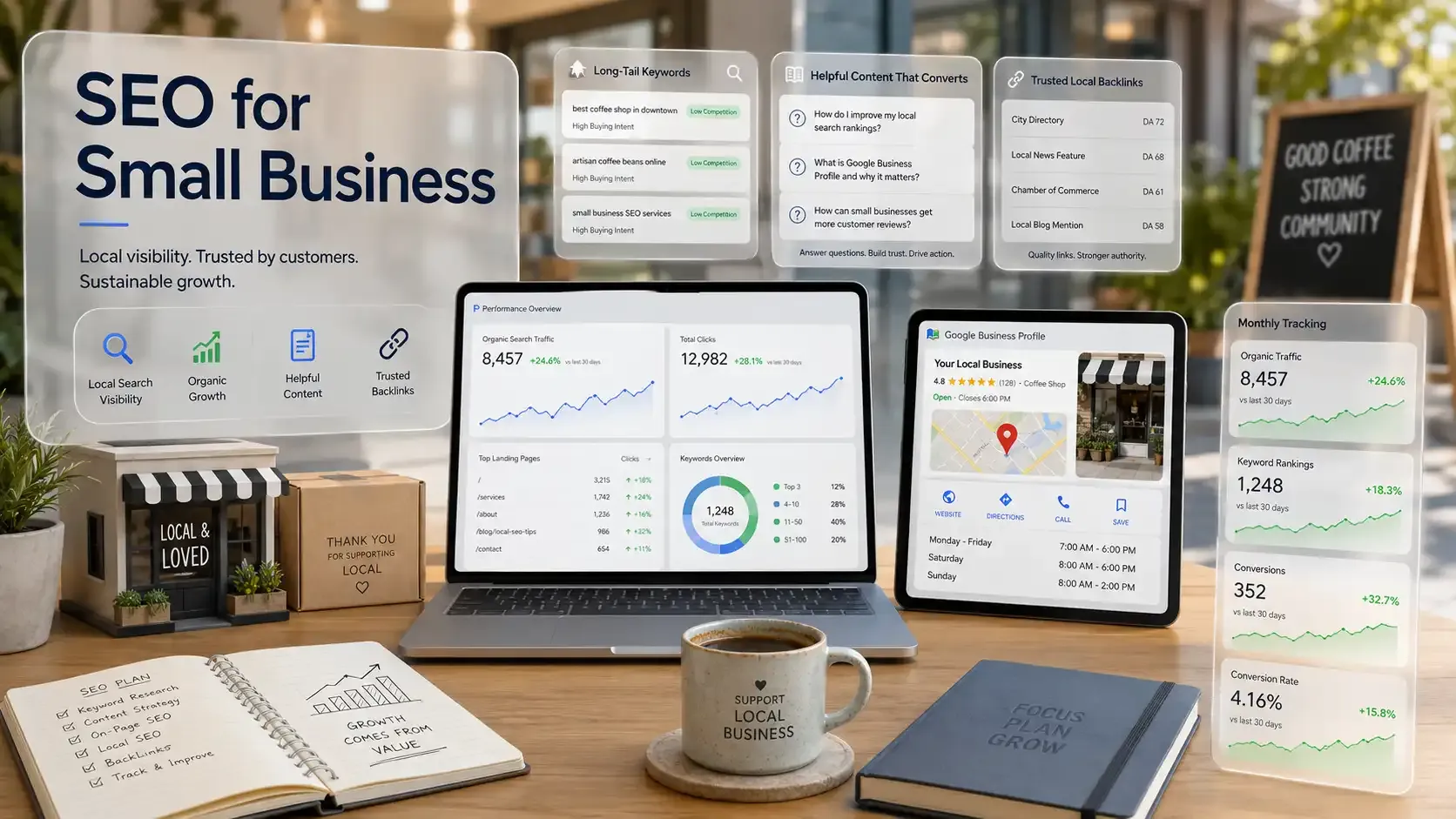
Target long-tail keywords with low competition and high buying intent instead of chasing broad, competitive terms.
Create detailed, helpful content that answers real customer questions and builds quality backlinks from trusted local sources.
Track organic traffic, keyword rankings, and conversions monthly because SEO without measurement is guesswork.
SEO for a small business is the process of optimizing your website so customers find you on Google without paying for ads. Sounds simple, right? But most small business owners never get around to it because they're too busy running the actual business.
I was the same way. I kept putting it off, convinced I needed a marketing team or a big budget to make SEO work. That was wrong.
What I actually needed was a clear starting point and a system I could follow without drowning in technical details.
In this guide, I will break down how to set up your SEO foundation. I will also cover how AI search is changing the game for small businesses in 2026 and which free tools give you the most value.
What Is SEO and Why Does It Matter for Small Businesses?
SEO stands for search engine optimization. In plain terms, you improve your website so Google can find it, understand it, and show it to people who search for what you sell. For small businesses, it is the affordable and most reliable way to attract customers without paying for ads.
Here's how Google works behind the scenes:
- Crawling: Google sends bots to scan every page on your website.
- Indexing: Those bots store your content in a massive database.
- Ranking: Google decides which pages to show first based on quality, relevance, and trust signals.
So why does this matter if you run a small business?
Because you probably cannot outspend a national brand on advertising. But you can outrank them. SEO gives a solo plumber or a two-person cleaning company the same shot at page one as a franchise with a million-dollar marketing budget.
Here's what SEO actually does for a small business:
- Brings in free, consistent traffic without paying per click
- Builds trust because customers click organic results more than ads
- Targets people who are already searching for what you sell
- Keeps working for months and years after you publish
This is also where SEO pulls ahead of paid ads. With PPC, you pay for every click, and traffic vanishes the moment you pause your budget. SEO takes 3 to 6 months to gain traction, but it compounds over time instead of disappearing overnight.
The data proves it. The largest US websites found that roughly 90% of all search clicks still go to organic results. Google itself confirmed in August 2025 that total organic click volume has stayed stable year over year. [Source: Search Engine Land]
And Entrepreneur reinforces why this matters for you specifically.
Here's the number that convinced me. In B2B, SEO leads convert at 14.6%, well ahead of social media. People who find your business through search already want what you offer, so your only job is to show up before the competition does.
Small Business SEO vs. Local SEO: What's the Difference?
Small business SEO covers every strategy you use to rank higher on search engines and grow your online visibility. Local SEO is one piece of that bigger picture. It focuses specifically on showing up in "near me" searches, Google Maps, and city-based queries.
Here's the easiest way to tell them apart:
| Local SEO | Small Business SEO | |
|---|---|---|
Goal | Rank in map pack and "near me" results | Build site authority and organic traffic |
Target Area | Specific city or service radius | Regional, national, or global |
Key Platforms | Google Business Profile, local directories | Website, blog, industry platforms |
Key Factors | Proximity, reviews, NAP consistency | Keywords, backlinks, content quality, site speed |
So which one do you actually need?
A plumber in Dallas needs local SEO because customers search "plumber near me," not just "plumber." An online course creator selling nationwide needs general SEO to rank for topic-based keywords instead. And a cleaning company with a service area? It needs both.
So, local SEO to show up in the map pack and general SEO to rank blog posts that pull in leads from organic search.
Most service-based small businesses fall into that last category. You want local customers to find you on Maps, but you also want your website content to bring in traffic beyond your zip code.
How to Do SEO for Small Businesses: Step-by-Step Guide
I spent months figuring out SEO through trial and error. So here's the exact process that worked wonders for me:
Step 1: Set Up Google Search Console and Google Analytics
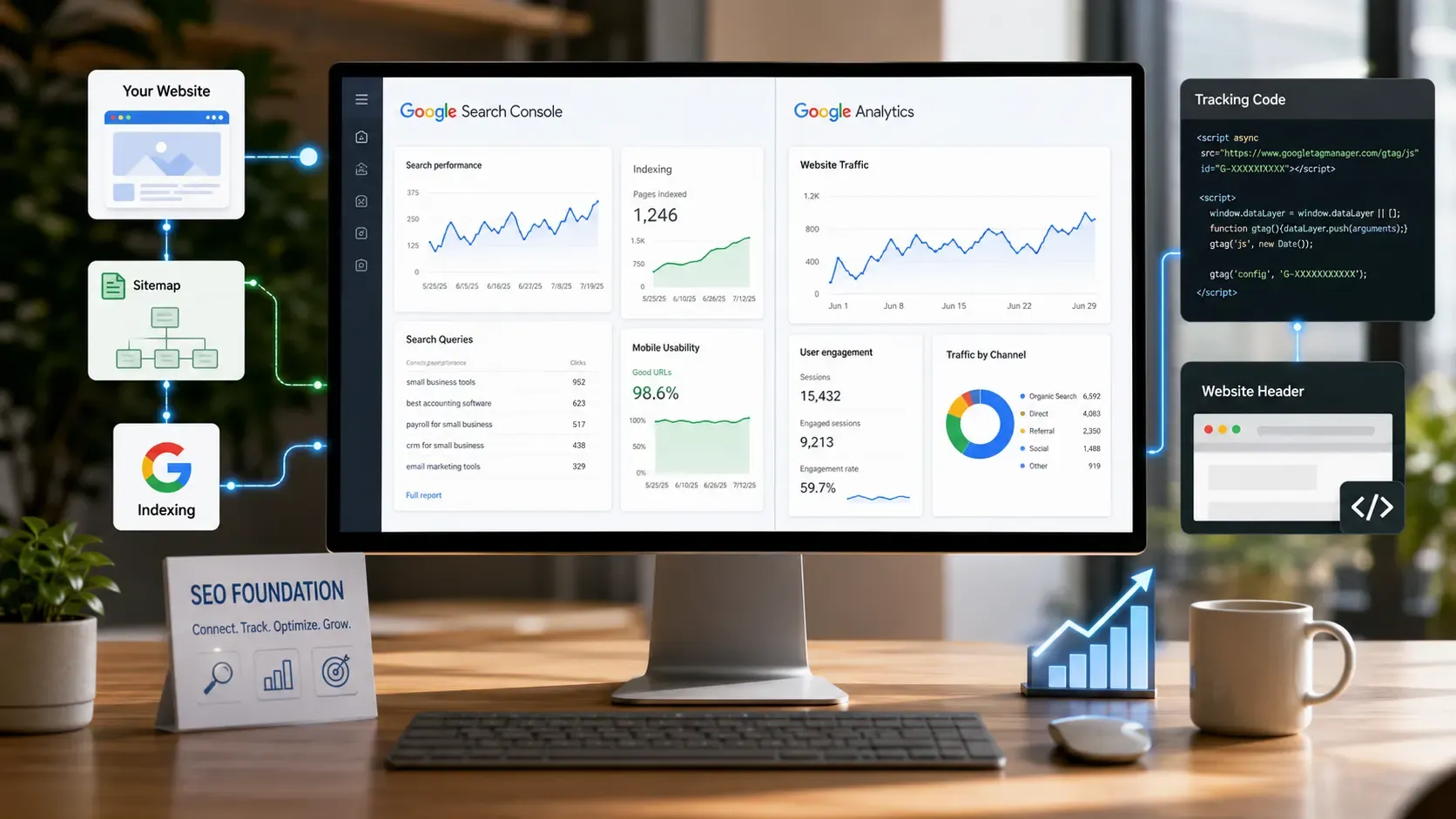
Before you touch a single keyword, connect your website to Google Search Console and Google Analytics 4. These two free tools are your SEO foundation.
Here's what each one does.
Search Console shows which keywords bring people to your site, which pages Google has indexed, and whether anything is broken. Analytics tracks what visitors do after they arrive, like which pages they read and where they leave.
Setting both up takes under 20 minutes. Add your website, verify ownership, submit your sitemap in Search Console, and paste the Analytics tracking code into your site header. If you run WordPress, the Site Kit plugin by Google handles both in one step.
Once they're running, check three things right away:
- Indexing issues: Make sure Google can actually find and crawl your pages.
- Top search queries: See which keywords already drive clicks to your site.
- Mobile usability: Confirm your pages load properly on phones.
Without this data, every other SEO step turns into guesswork.
Step 2: Do Keyword Research for Your Business
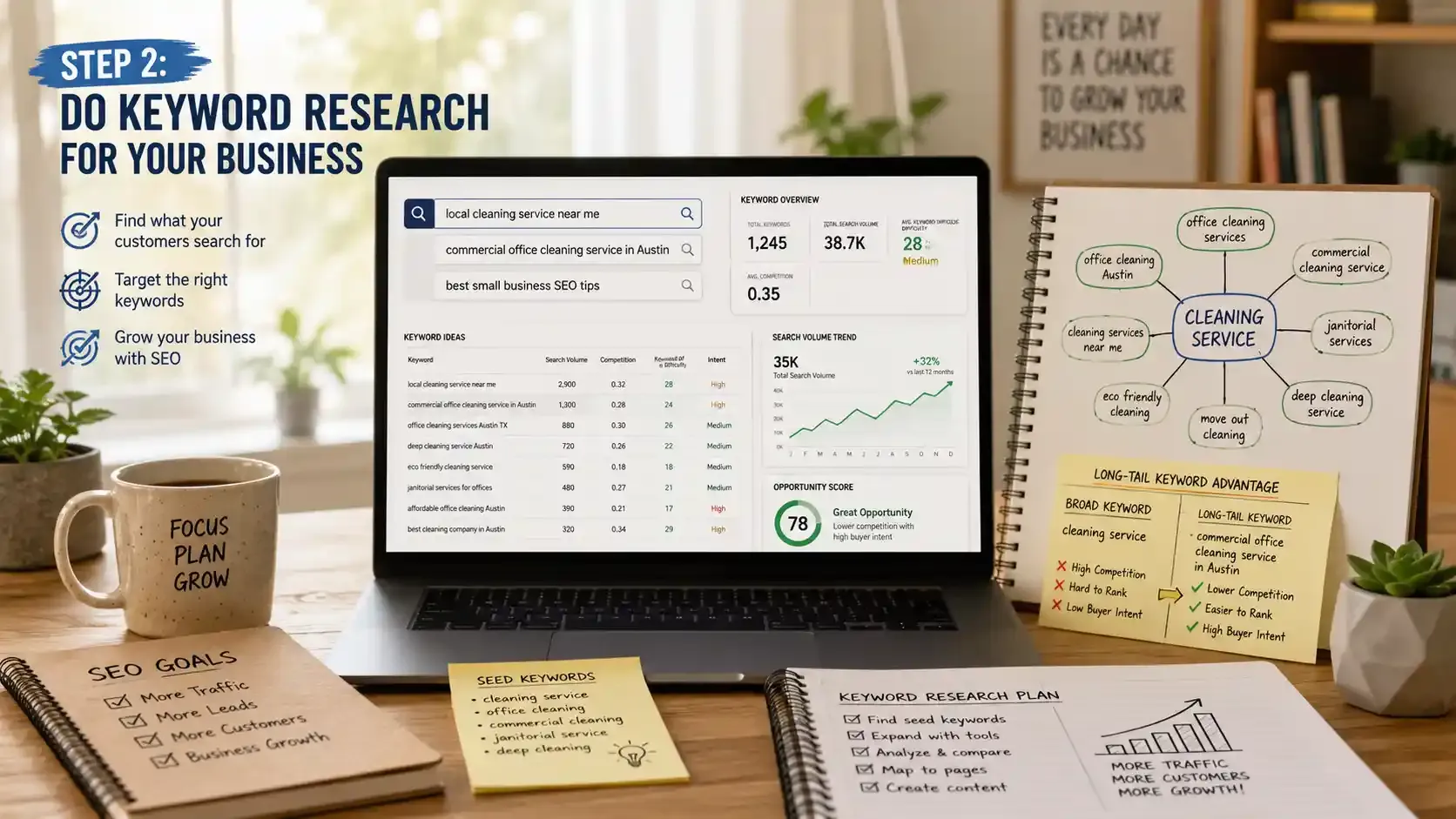
Keyword research means finding the exact words and phrases your potential customers type into Google when looking for what you sell. Skip this step, and you end up creating content nobody searches for.
Start by thinking like your customer. If someone needed your service right now, what would they type? Write down 10 to 15 of those phrases. These are your seed keywords.
Next, expand that list with free tools:
- Google Keyword Planner shows monthly search volume and competition for any term.
- Google Autocomplete reveals real searches the moment you start typing in the search bar.
- AnswerThePublic pulls up questions people ask around your topic.
- Ubersuggest gives keyword ideas with difficulty scores and content suggestions.
For deeper analysis, paid tools like Ahrefs, SEMrush, and Moz uncover competitor keywords and ranking gaps that free options miss.
But here's where most small businesses go wrong. They chase broad terms like "cleaning service" and never rank because the competition is brutal. Long-tail keywords fix this.
A phrase like "commercial office cleaning service in Austin" carries lower competition and much stronger buying intent. The real opportunity for small businesses lies in those specific, niche phrases that big brands overlook.
When you assign keywords, follow one simple rule. Pick one primary keyword per page and 3 to 5 supporting terms around it. Your homepage targets your core business keyword. Service pages target specific offerings. And blog posts answer the questions your customers already search for.
More leads mean more jobs. Be ready to handle them.
FieldServicely helps growing service teams stay organized at every step.
Step 3: Optimize Your On-Page SEO
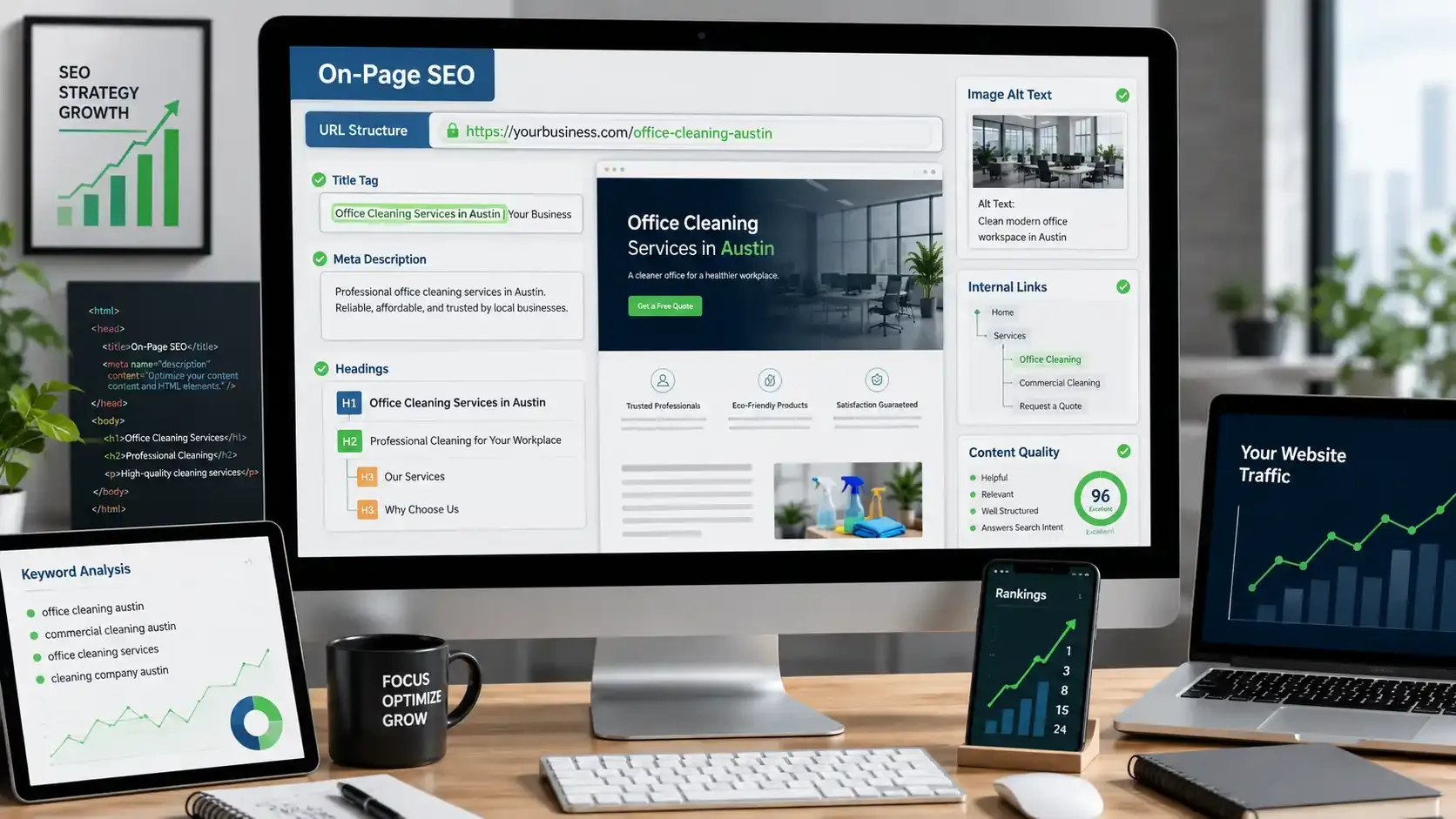
On-page SEO means tweaking the content and HTML elements on each page, so Google clearly understands what it covers. You can publish great content all day long, but messy on-page elements will bury your rankings.
Here's the checklist I run through for every page on my site:
- Title tag: Keep it under 60 characters with your primary keyword near the front. Example: "Office Cleaning Services in Austin | [Your Business]."
- Meta description: Write a compelling summary under 155 characters that includes your keyword and makes people want to click.
- Headings: Use one H1 per page with your main keyword. Break the rest of the content into H2s and H3s for clear structure.
- URL structure: Keep URLs short and keyword-rich. Use "yoursite.com/office-cleaning-austin" not "yoursite.com/page?id=4827."
- Image alt text: Describe every image in plain words and include your keyword where it fits naturally.
- Internal links: Connect related pages across your site so both visitors and Google bots move through them easily.
- Content quality: Answer the searcher's question directly within the first few lines, then expand with real examples and useful context.
That last point carries the most weight. Google's SEO documentation says content built for people ranks better than content stuffed with keywords. Write for your customer first. Optimize for search engines second.
Step 4: Optimize Your Google Business Profile for Local SEO
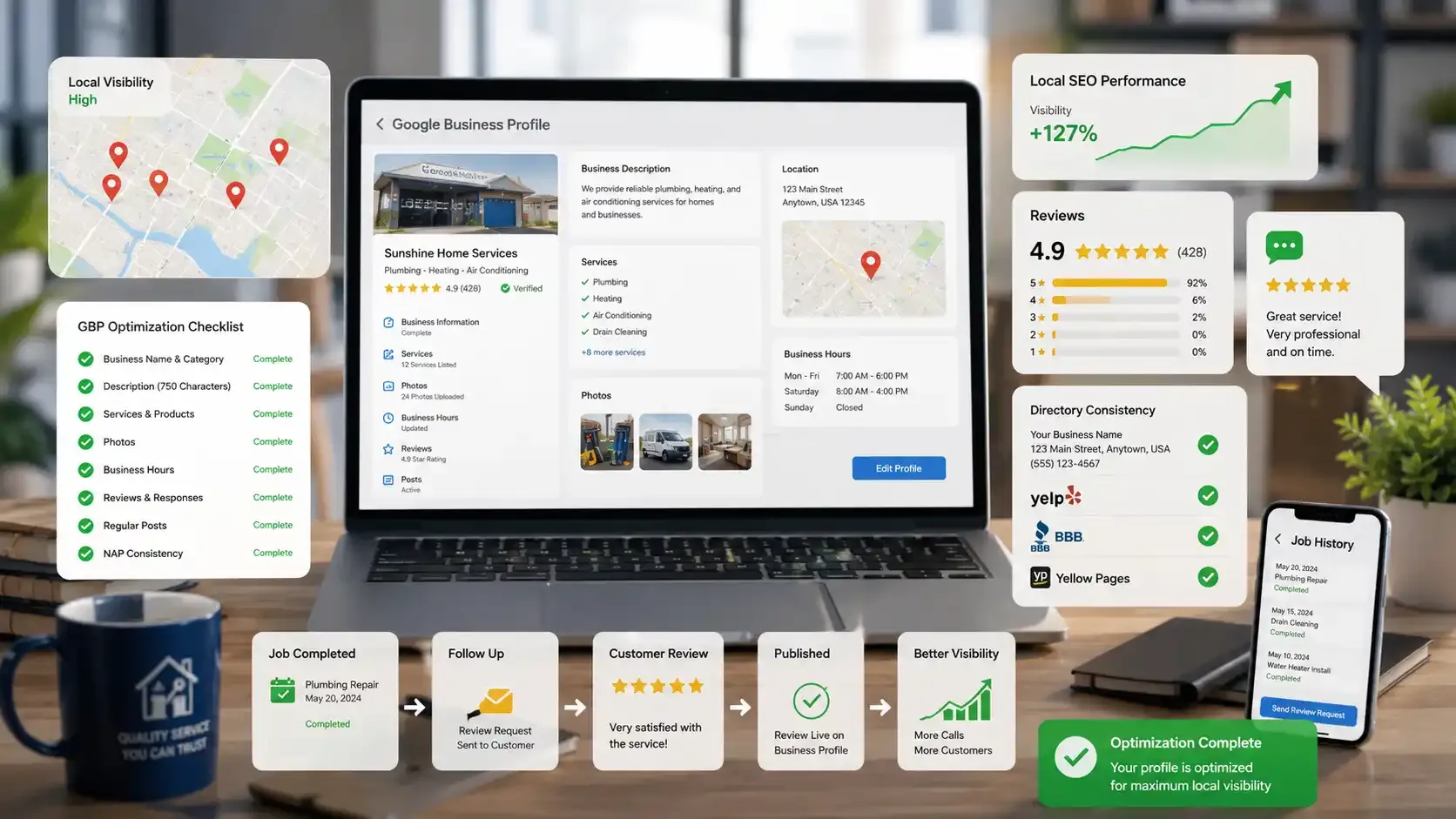
Your Google Business Profile (GBP) is the single most important factor for showing up in the Google Maps Pack and local search results. If you serve customers in a specific area, this is where you start.
Claim your profile, verify ownership through phone or video, and fill out every single field. I mean every field. Google rewards complete profiles with better local visibility.
Here's what to optimize on your GBP:
- Business name and primary category: Match your real business name and pick the most specific category Google offers.
- Description: Use all 750 characters. Lead with your main service and location naturally.
- Services and products: List every offering individually so Google can match you to more searches.
- Photos: Upload real images of your team, workspace, and completed jobs. Profiles with photos attract significantly more clicks.
- Hours: Keep regular and holiday hours accurate at all times.
Next, lock down your NAP consistency. Your Name, Address, and Phone number must match exactly across your website, GBP, Yelp, BBB, and every other directory.
Even small mismatches like "St." versus "Street" confuse search engines and drag your local rankings down.
Now here's the part most small businesses overlook. Google treats customer reviews as a direct ranking signal for local search. Ask every satisfied customer to leave a review, and respond to each one personally.
A simple "Thank you, glad we could help" shows both Google and future buyers that you actively engage.
On top of reviews, post regular updates to your profile. Share photos from recent jobs, announce seasonal offers, or highlight a new service. These posts tell Google your business is alive, not a stale listing collecting dust.
For service-based businesses like cleaning crews, plumbers, or HVAC teams, tools like FieldServicely help you finish jobs faster and follow up with customers for reviews right after service. That review pipeline directly feeds your local SEO and keeps your GBP ranking strong.
More reviews start with better service experiences.
Complete jobs faster and keep customers coming back with smarter workflows.
Step 5: Create Helpful, Search-Optimized Content
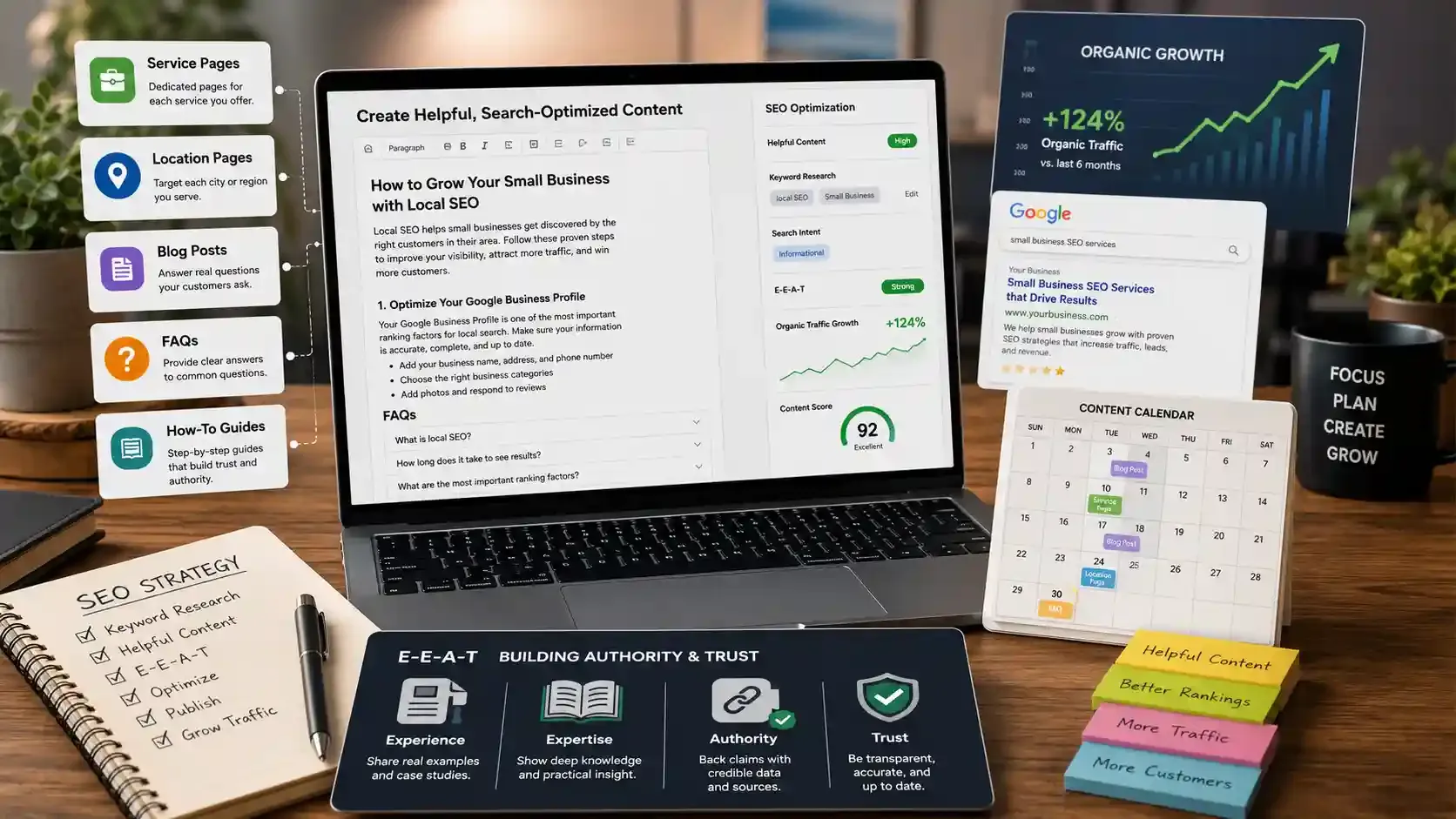
Content is how you prove to Google and your customers that your business actually knows what it's talking about. Blog posts, service pages, FAQs, and how-to guides all build authority and pull in organic traffic over time.
But not all content carries the same weight. Start with what converts first, then expand:
- Service pages: Create one dedicated page for each service you offer, optimized with its own primary keyword.
- Location pages: If you serve multiple areas, build a separate page for each city or region you cover.
- Blog posts: Answer the real questions your customers already ask. Use Google's "People Also Ask" box and Autocomplete suggestions to find exactly what they search for.
The biggest mistake I made early on was writing for search engines instead of people. That approach backfired completely. Google's helpful content system now rewards pages that deliver genuine value to real readers, not keyword-stuffed pages built for bots.
And depth makes a measurable difference. 21% of bloggers report strong results overall. But that number nearly doubles to 39% among those who publish detailed posts over 2,000 words.
The study calls this "one of the strongest correlations in the report.
Here's a content rhythm that works for small businesses. Publish 2 to 4 posts per month. Each one should tackle a specific problem your customer cares about. Focus on depth and real answers over hitting a word count.
Every piece you publish should also carry clear E-E-A-T signals:
- Experience: Share real examples from jobs you've completed or problems you've solved.
- Expertise: Show deep understanding of both the problem and the solution.
- Authority: Back claims with credible data and link to sources.
- Trust: Stay transparent, cite accurately, and keep information up to date.
Writing this way takes more effort upfront. But one strong article that ranks on page one can bring in leads for years without a single dollar in ad spend.
Read More: Marketing a Janitorial Business: Step-by-Step Guide
Step 6: Build Backlinks to Your Website
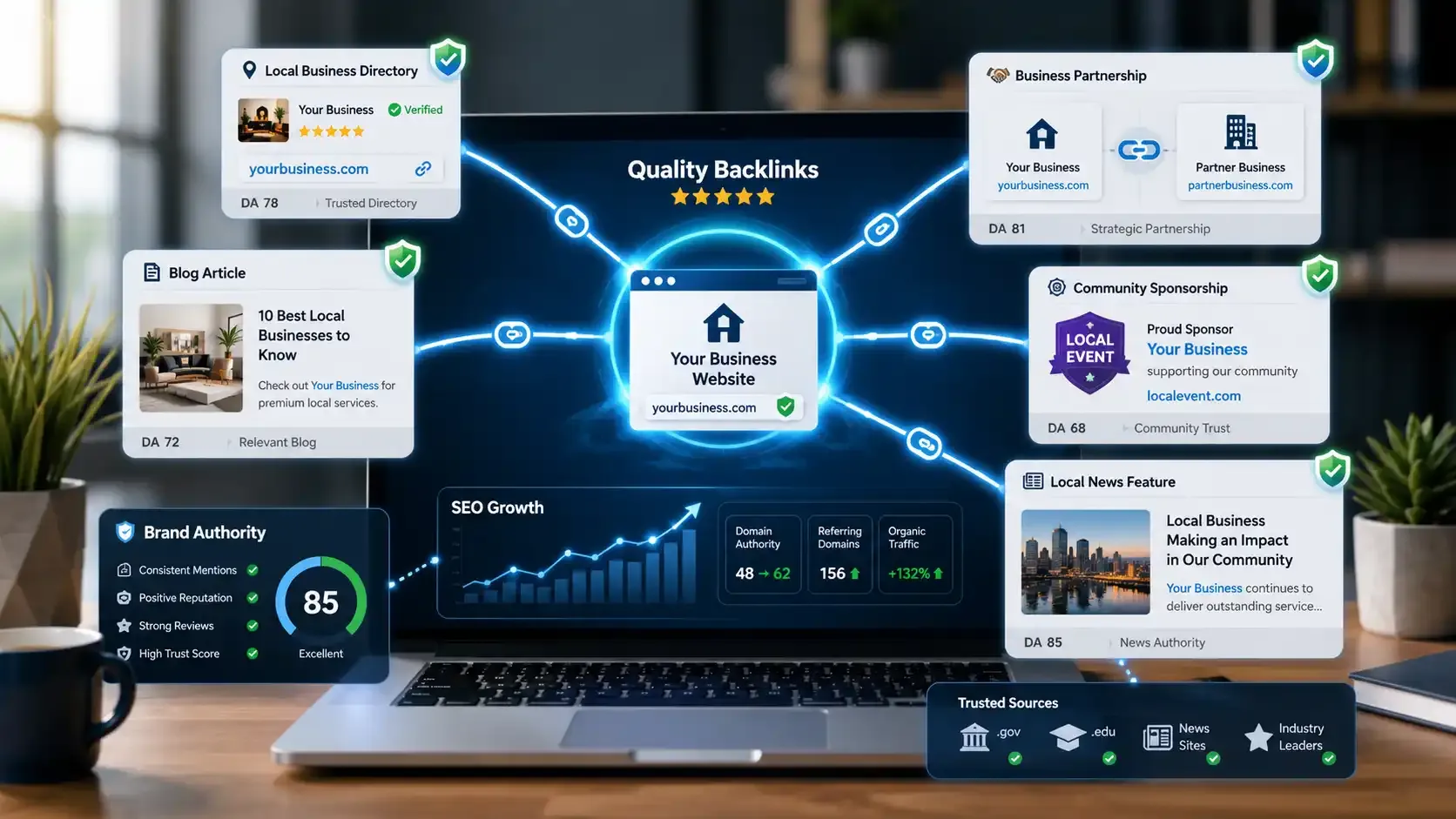
Backlinks are links from other websites pointing to yours. They work like votes of confidence that tell Google your business is credible and worth ranking higher.
But not all backlinks help. One link from a trusted, relevant website does more for your rankings than fifty links from random directories. Quality always wins over quantity.
Here are free link-building tactics that actually work for small businesses:
- Local directories: List your business on Yelp, BBB, your local chamber of commerce, and industry-specific directories.
- Guest posts: Write a helpful article for an industry blog and include a natural link back to your site.
- Partnerships: Team up with complementary local businesses and link to each other. A plumber and a home inspector make a perfect pair.
- Local sponsorships: Sponsor a community event, charity run, or youth sports team. Most organizations link to their sponsors on their website.
- Local press: Pitch a story to your local news outlet. A new service launch or community initiative can earn you a solid media backlink.
If you lack the time or expertise to manage outreach yourself, reputable link building agencies can help. Just as important, know what to avoid. Buying links, using link farms, or submitting to spammy directories can trigger Google penalties and destroy your rankings overnight.
And the rules are changing fast. The Entrepreneur reported in November 2025 that link building now centers on trust, not just links. When your brand gets mentioned in articles, reviews, and community forums, search engines and AI systems read those mentions as credibility signals.
Even without a direct hyperlink, an unlinked brand mention signals to Google that your business carries weight. This shift is only accelerating as AI-powered search grows.
Build online trust with a business customers can rely on.
Track jobs, teams, and customer details without the paperwork.
Technical SEO Basics Every Small Business Should Know
Technical SEO ensures that search engines can crawl, index, and understand your website without encountering issues. Think of it as the foundation your content sits on. If the foundation cracks, nothing you build on top of it will stand.
Here's a quick checklist of what to get right:
- Site speed: Your pages should load in under 3 seconds. Use Google PageSpeed Insights to test your site and find what slows it down.
- Mobile-friendliness: Statista reported that mobile devices generated over 58% of global web traffic in 2025. If your site doesn't work well on a phone, you're invisible to more than half your potential visitors.
- HTTPS security: Google flags non-secure websites with a warning in the browser. An SSL certificate is non-negotiable in 2026. Use an SSL checker to verify that your certificate is valid and properly configured.
- XML sitemap and robots.txt: Your sitemap tells Google which pages exist. Your robots.txt file tells it which pages to skip. Submit both through Google Search Console.
- Schema markup: Add LocalBusiness, FAQ, and Product schema to help Google display rich results like star ratings, business hours, and FAQs directly in search.
- Broken links and redirects: Fix dead links, clean up redirect chains, and remove duplicate content. These slow down crawling and confuse search engines.
You don't need to be a developer to handle this. Free tools like Google PageSpeed Insights, Screaming Frog (free for up to 500 URLs), and Ahrefs Webmaster Tools can audit your site and flag exactly what needs fixing.
I ignored technical SEO for months when I started. My content was solid, but pages loaded slowly, images had no alt text, and Google hadn't even indexed half my site. Once I cleaned it up, rankings started moving within weeks. The content was always good. The foundation just wasn't holding it up.
Google's AI Overviews, ChatGPT, and Perplexity are changing how customers discover businesses online. Small businesses that learn to optimize for AI visibility now will capture traffic their competitors miss entirely.
So what exactly is happening?
Google now places AI-generated summaries at the top of many search results. These answer the user's question directly on the page, often without them needing to click any link. This is called a zero-click search, and it is growing fast.
The data shows how real this shift already is. Users clicked on search results only 8% of the time when an AI summary appeared, compared to 15% without one. About 18% of all Google searches in March 2025 already triggered an AI summary.
That sounds scary. But here's why it actually helps small businesses.
AI systems pull answers from content that is clear, specific, and well-structured. Generic, surface-level pages from big brands get skipped. Detailed, niche content from real experts gets cited. That plays directly into your strengths as a small business owner who knows your field inside out.
Here's how to optimize for AI search:
- Answer questions directly. Write 50 to 60-word answers at the top of each section. AI pulls these for summaries.
- Use FAQ schema. Structured Q&A content gives AI systems clean data to work with.
- Build topical authority. Publish multiple posts around one core topic, so AI recognizes you as a go-to source.
- Write in simple, clear language. AI favors content that is easy to parse and summarize.
This is where Answer Engine Optimization (AEO) and Generative Engine Optimization (GEO) come in.
AEO focuses on getting your content featured in AI-generated answers. GEO focuses on being cited as a source inside those answers. Both reward the same thing: clarity, depth, and real expertise.
Also Read: SEO for Cleaning Business: How to Rank Higher on Google
Stay ahead with smarter tools for modern service businesses.
Save time and manage more customers with automated workflows.
Best Free and Affordable SEO Tools for Small Businesses
You don't need expensive software to do SEO well. Most of the tools that matter are either free or cost less than a meal out. Here are the ones I use and recommend.
| Tool | What It Does | Cost |
|---|---|---|
Google Search Console | Track search performance, fix indexing issues | Free |
Google Analytics 4 | Monitor traffic, user behavior, and conversions | Free |
Google Business Profile | Manage local search presence | Free |
Google Keyword Planner | Find keyword ideas and search volume | Free |
AnswerThePublic | Find questions people ask about your topic | Free(limited) |
Ahrefs Webmaster Tools | Backlink analysis, site health audit | Free |
Yoast SEO / AIOSEO | On-page SEO optimization for WordPress | Free / Premium |
Screaming Frog | Technical site audit, find broken links | Free (up to 500 URLs) |
Ubersuggest | Keyword research, site audit, competitor analysis | From $29/mo |
SEMrush | Full SEO suite: keywords, audit, tracking, content | From $139.95/mo |
Start with the free tools. Google Search Console and Google Analytics alone give you more data than most small businesses ever act on. Add Screaming Frog for a quick technical audit and AnswerThePublic for blog topic ideas.
Only upgrade to paid tools when you hit limits. Ubersuggest at $29 per month covers keyword research, competitor analysis, and site audits for most small businesses. SEMrush at $139.95 per month is the full package, but you probably won't need it until your SEO efforts scale past the basics.
The best tool is the one you actually use. I wasted money on paid subscriptions I barely opened. Start free, learn the fundamentals, and spend only when you have a clear reason to.
How to Measure Your SEO Results
If you're not tracking your SEO performance, you're guessing. And guessing is how small businesses waste months on strategies that aren't working.
Here are the exact metrics to monitor every month:
- Organic traffic: Check Google Analytics to see how many visitors come from search engines. A steady upward trend means your SEO is working.
- Keyword rankings: Use Google Search Console to track which queries bring clicks. Watch for position changes on your target keywords.
- Google Business Profile data: Monitor impressions, clicks, calls, and direction requests. These tell you how visible you are in local search.
- Click-through rate (CTR): A low CTR means your title tags and meta descriptions need work, even if you rank well.
- Bounce rate and time on page: High bounce and low time signal that visitors aren't finding what they expected.
- Leads and conversions: Track form fills, phone calls, and purchases from organic traffic. This is the metric that actually pays the bills.
Review these numbers once a month. Adjust your strategy every quarter based on what the data shows. If a blog post drives traffic but no conversions, fix the call to action. If a page ranks on page two, update the content and strengthen internal links.
For realistic benchmarks, a small business doing consistent SEO should aim for 10 to 20% organic traffic growth month over month in the first year. Results compound. The first three months feel slow. By month six, the curve starts bending upward.
Common SEO Mistakes Small Businesses Make
Most small businesses don't fail at SEO because it's too hard. They fail because they repeat the same avoidable mistakes that quietly kill their rankings before any real traction builds.
I made several of these myself. Here are the ones that cost me the most time and traffic:
- Chasing broad keywords like "cleaning service" instead of specific long-tail phrases that actually convert.
- Setting up Google Business Profile once and never updating photos, posts, or responding to reviews.
- Stuffing keywords into every sentence instead of writing the way a real person talks.
- Ignoring mobile entirely, even though more than half of all web traffic comes from phones.
- Publishing thin content that barely scratches the surface instead of answering the full question.
- Buying cheap backlinks from shady services that promise "500 links for $50" and end up triggering Google penalties.
Two more mistakes deserve their own callout because they silently wreck progress.
The first is inconsistent NAP data. If your business name, address, or phone number differs between your website, Google Business Profile, and Yelp, search engines lose trust in your listing. Even small formatting differences cause problems.
The second is quitting too early. SEO takes 3 to 6 months before results start showing up. Too many small business owners give up at month two because they expected instant rankings. The businesses that win are the ones that stay consistent when nothing seems to move yet.
Conclusion
SEO for small businesses is not optional in 2026. It is how your customers find you. Start with your Google Business Profile, then move to keyword research, on-page optimization, content, backlinks, and tracking.
You don't need to do everything at once. Pick one step, execute it well, and build from there. If you run a service-based business, streamlining your operations with a tool like FieldServicely gives you back the hours you need to actually invest in your SEO.
Small Business SEO FAQs
How Much Does SEO Cost for a Small Business?
SEO can cost anywhere from $0 to $5,000+ per month, depending on your approach. DIY with free tools costs nothing but your time. Hiring a freelancer runs $500 to $2,000 monthly. A full-service agency typically charges $2,000 to $5,000 or more.
How Long Does It Take To See SEO Results?
Most small businesses see early signs of traction within 3 to 6 months. Meaningful results like consistent traffic and leads usually take 6 to 12 months. Timeline depends on your industry competition, content quality, and how consistently you execute.
Can I Do SEO Myself or Should I Hire Someone?
Yes, you can handle the basics yourself. Setting up Google Search Console, doing keyword research, optimizing pages, and writing content are all DIY-friendly. Consider hiring a professional when you need technical fixes, advanced link building, or when your time is better spent running the business.
Is SEO Still Worth It in 2026 With AI Search?
Absolutely. AI Overviews and tools like ChatGPT still pull answers from optimized websites. SEO in 2026 means optimizing for both traditional Google rankings and AI-generated answers. Small businesses with clear, well-structured content are actually better positioned for AI visibility than large, generic brands.
What's the Difference Between SEO and PPC?
SEO brings free organic traffic that builds over time. PPC gives you instant paid traffic that disappears the moment you stop spending. SEO compounds. PPC drains. Most small businesses get the best results when they start with SEO and layer PPC on top once they have a budget.
What to read next
Field Service Business
SEO for Healthcare Industry: 8 Proven Strategies for Better Visibility
See Details