- Scheduling and Dispatch
7 Signs Your Business Needs Scheduling Software
Updated on 30 Apr 2026
Jump to
Summary

Spending hours on manual scheduling, handling double-bookings, and chasing no-shows wastes time and reduces efficiency.
Poor communication and lack of real-time visibility cause staff confusion, missed shifts, and frustrated clients.
Manual systems limit growth, creating hesitation to take on new clients and lose revenue opportunities.
Customers expect 24/7 online booking, and friction in scheduling drives them to competitors.
Hidden labor costs and compliance risks increase financial exposure, while scheduling software surfaces cost data and reduces errors.
Running a business without scheduling software starts to show cracks quickly. Early signs appear in everyday operations, like spending hours on manual bookings, juggling double-bookings, or chasing no-shows.
These small issues soon ripple into bigger problems, including confused staff, missed shifts, and frustrated customers.
In this blog, we will break down seven clear signs that indicate a business needs scheduling software. We will also show how the right solution streamlines operations, reduces errors, and protects both revenue and customer trust.
Signs Your Business Needs Scheduling Software
Running a business on sticky notes and group chats works. Until it doesn't.
One week, you're managing fine. Next, you've got two clients booked at the same time. A staff member who showed up at the wrong address, and three unanswered booking emails sitting in your inbox.
Nobody plans to run their business this way. It just creeps up on you. And by the time you notice it, you're already losing money.
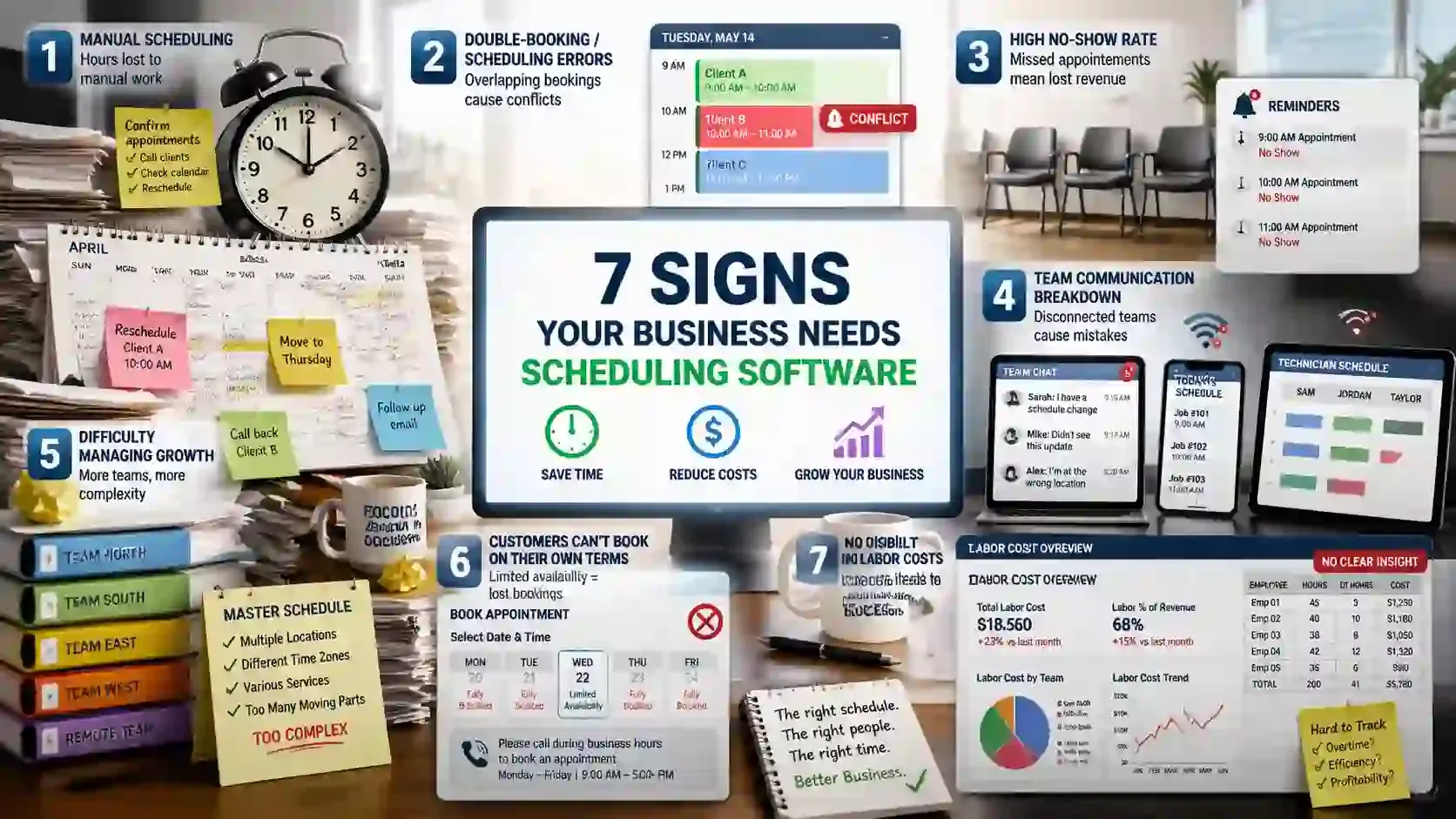
Sign 1: You Spend More Than 5 Hours a Week on Manual Scheduling
If you are spending more than 5 hours a week managing bookings, you are not running your business. You are babysitting a calendar.
According to Deloitte, automated scheduling can save businesses between 10% to 15% on labor costs alone. For a small team, that is real money sitting in a process you could fix this week.
Now think about what 5 hours of manual scheduling actually looks like on a Monday morning.
You start the day confirming Tuesday's appointments over text. A client reschedules, which knocks three other slots out of place. By noon, you have answered 11 emails that had nothing to do with serving clients.
That is the dispatcher problem. Everything runs through you. Your staff cannot move without checking in first. Your clients cannot book until they receive a reply.
If that sounds familiar, that is a system problem.
Five hours a week on admin is 260 hours a year. That is more than six full working weeks spent on a problem that scheduling software solves in the background.
Sign 2: Double-Bookings and Scheduling Errors Keep Happening
Double-booking errors don’t happen because your team lacks effort; they happen because your system can’t handle the volume. Studies show that automated scheduling tools reduce double‑booking errors by about 92 percent.
So most conflicts are preventable with the right tech.
Before I used scheduling software, I dealt with two clients showing up for the same slot more than once a week. This created confusion and anger in real time and encouraged some clients to book elsewhere because they no longer trusted my calendar.
When you rely on spreadsheets, handwritten notes, or phone calendars, small timing mismatches add up fast as bookings increase. Manual tools simply don’t update in real time across platforms, so two people can reserve the same hour without the system catching the conflict.
If two clients repeatedly end up with the same time, you’re not just losing a slot; you’re damaging trust and hurting your reputation. Reliable scheduling stops these errors in their tracks and keeps your clients confident that your business values their time.
Sign 3: Your No‑Show Rate Is Eating Into Revenue
Your no‑show problem gets worse when you rely on no reminders, because people simply forget their appointments and don’t show up.
In fact, without automated reminders, most appointment‑based businesses see no‑show rates between 10 percent and 25 percent, and those missed slots translate directly into lost revenue.
More importantly, missing reminders means you lose money you could have earned. Did you know that the average business loses at least $200 per missed appointment?
This figure does not account for lost staff productivity, empty preparation time, and the opportunity cost of a slot. So the actual impact is even higher!
That’s why automated reminders matter so much, and why businesses with SMS + email reminders cut no‑shows dramatically, often by 30–60 percent.
Sign 4: Your Team’s Communication Is Breaking Down
When your team keeps showing up late, misses shifts, or ends up at the wrong location, it usually points to poor communication and a lack of real‑time visibility. And that’s obvious because 86 percent of employees cite ineffective communication as a major cause of failures at work.
This problem often happens because all schedule updates and job notes run through a single person instead of a shared system. When only one team member holds the current schedule, others miss changes or assume the next shift starts on outdated information.
Real‑time visibility fixes this breakdown. Modern scheduling tools let every employee see the latest schedule, receive live updates, and check job notes whenever details change. This clarity cuts down on confusion and ensures everyone knows their work plan before they even arrive.
Plus, mobile access makes these updates available anywhere, and job notes keep everyone in sync about special instructions or on‑site details. In practical terms, teams that move to live schedule visibility stop relying on texts, emails, and group chats to share updates.
Thus, it reduces mistakes and keeps everyone coordinated, even in fast‑moving environments.
Sign 5: Your Business Can’t Handle Growth
As you get more employees and services, the coordination becomes harder to manage. When that happens, manual calendars and spreadsheets force managers to spend hours fixing mistakes instead of booking new work.
That complexity directly affects revenue, as hesitation to take new clients usually happens when your schedule feels fragile and unreliable. Many businesses stop accepting additional appointments because traditional systems can’t handle the load without errors.
Modern software supports real business growth by centralizing schedules and automating conflicts so you don’t lose business simply due to internal limits. When a scalable system updates availability instantly across multiple teams and locations, it removes the logistical ceiling that manual methods impose.
Sign 6: Customers Can’t Book on Their Own Terms
Customers expect 24/7 online booking as a baseline expectation. Because modern buyers shop and schedule outside typical business hours. 73 percent of appointments are booked online or via mobile, proving that people now choose self‑service first, not phone calls.
When booking requires calls during business hours, friction builds, and customers don’t hesitate to leave for competitors with online booking.
More than 80 percent of millennials say they prefer a provider that offers online booking. Whereas 44 percent of Gen Z won’t book at all without it, showing friction costs clients. [Source: SchedulingKit]
This means lost bookings translate directly into lost revenue. Customers simply choose the businesses that meet them where they are. Self‑service booking acts as a non‑negotiable part of the customer experience now.
Sign 7: You Have No Visibility Into Labor Costs
Late insight prevents timely decisions and hides the real financial impact. Discovering labor issues post-payroll also creates compliance risks because managers cannot adjust schedules to meet labor laws.
Mistakes in overtime, rest periods, or pay rates can trigger penalties and employee disputes. Without real-time cost data, businesses cannot act before violations occur, increasing financial and legal exposure.
Scheduling software addresses this by surfacing cost data proactively. Real-time dashboards track hours, overtime, and projected labor costs before shifts start.
So managers can see potential wage spikes and adjust staff allocations to stay within budget, reducing unnecessary spend. By connecting hours, payroll, and compliance data, managers understand how changes impact overall costs.
Streamline Your Scheduling with FieldServicely
Reduce manual errors and stay coordinated with real-time scheduling, mobile dispatch, and job tracking.
What is This Costing Your Business?
Lost revenue is measurable when scheduling issues go unresolved, and clients slip away because you can’t book reliably or capture after‑hours demand. Scheduling software can return $109,000–$127,000 in annual value by cutting no‑shows, saving time, and capturing extra bookings.
Moreover, wasted time compounds quickly when staff spend hours on manual booking, rescheduling, reminders, and fixes instead of serving paying customers. On the other hand, customer churn rises when friction in booking and internal errors frustrate clients.
And you cannot avoid compliance risk and labor cost. They add another layer of financial exposure because unplanned overtime, incorrect pay, and late adjustments can trigger penalties, disputes, and unpredictable payroll swings.
Even small inefficiencies add up quickly, from missed bookings to hidden overtime and compliance gaps. FieldServicely brings scheduling, job tracking, and mobile dispatch together in one view. This gives teams real-time clarity, keeps clients informed, and reduces revenue leaks without extra manual work.
Conclusion
If three or more of these signs resonate, it’s a clear signal that action is needed. Scheduling software is an investment in efficiency, accuracy, and growth. By automating bookings, reducing errors, improving team communication, and providing real-time cost visibility, it protects revenue and customer trust.
Frequently Asked Questions
How does scheduling software reduce no‑shows?
Scheduling software reduces no‑shows by sending automated reminders through email, SMS, or push notifications. Customers are prompted to confirm, reschedule, or cancel, which ensures they remember their appointment and reduces missed bookings.
How much does scheduling software cost?
The cost varies depending on features and business size. Basic plans are usually low‑cost or free, while more advanced tools with analytics, reminders, and integrations come with a monthly or per‑user subscription.
Can scheduling software help with labor law compliance?
Yes, it helps by tracking employee hours, scheduling within legal limits, and alerting managers to potential overtime or rest violations. This ensures schedules stay compliant and reduces the risk of penalties or payroll errors.
What to read next