
- Scheduling and Dispatch
CPM vs Gantt vs Last Planner: Which Scheduling Method Works the Best?
Updated on 12 May 2026
Jump to
Summary

CPM maps task dependencies to identify the critical path, making it best for large, multi-phase projects.
Gantt charts show tasks on a timeline, helping small to medium projects and stakeholders track progress easily.
LPS engages crews in pull-based planning, improving reliability, reducing rework, and coordinating trades effectively.
Using CPM, Gantt, and LPS together balances precise planning, clear visuals, and dependable field execution.
Continuous monitoring, smart resource allocation, risk management, and team training ensure schedules stay on track.
Construction project scheduling is critical for finishing projects on time and within budget. The right method improves coordination, reduces delays, and makes the best use of resources.
Managers often rely on Critical Path Method (CPM), Gantt charts, or the Last Planner System (LPS) to plan and track work. Each approach offers unique benefits and has limitations depending on project size, team structure, and complexity.
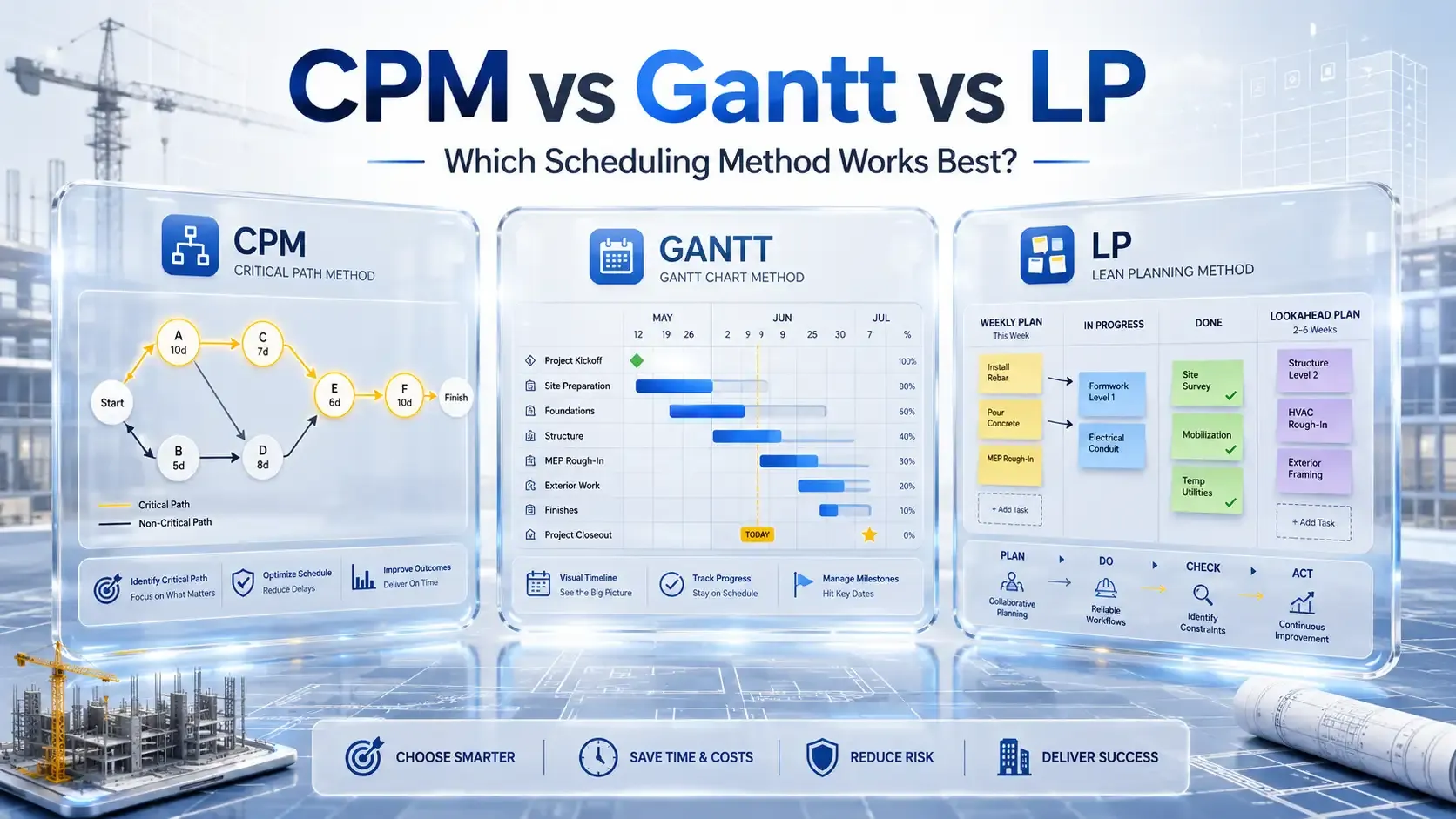
CPM calculates the task sequence for the shortest completion time, Gantt charts visualize timelines and progress, and LPS ensures crews can reliably execute weekly work.
This guide explains how each method works, compares their strengths and weaknesses, and shows when to use them, helping you pick the best fit for your construction project.
A Quick Comparison: CPM vs Gantt vs Last Planner in Construction
| Method | Definition | Best Use | Pros | Cons |
|---|---|---|---|---|
CPM | Top-down method showing the longest dependent tasks. | Large, complex projects. | Highlights bottlenecks; contract-ready. | Rigid; ignores daily changes; resource blind. |
Gantt | Visual timeline with task bars. | Small to medium projects; stakeholder updates. | Easy to read; tracks progress. | Weak on dependencies; may clutter. |
LPS | Pull-based, collaborative weekly planning. | High reliability, coordinated projects. | Boosts PPC; reduces rework. | Needs commitment; depends on crew input. |
Critical Path Method (CPM)
.webp?2026-05-12T04%3A08%3A32.777Z=&w=3840&q=100)
Focus: Logic, dependency, and duration analysis
Best For: Determining the shortest project duration and identifying bottlenecks
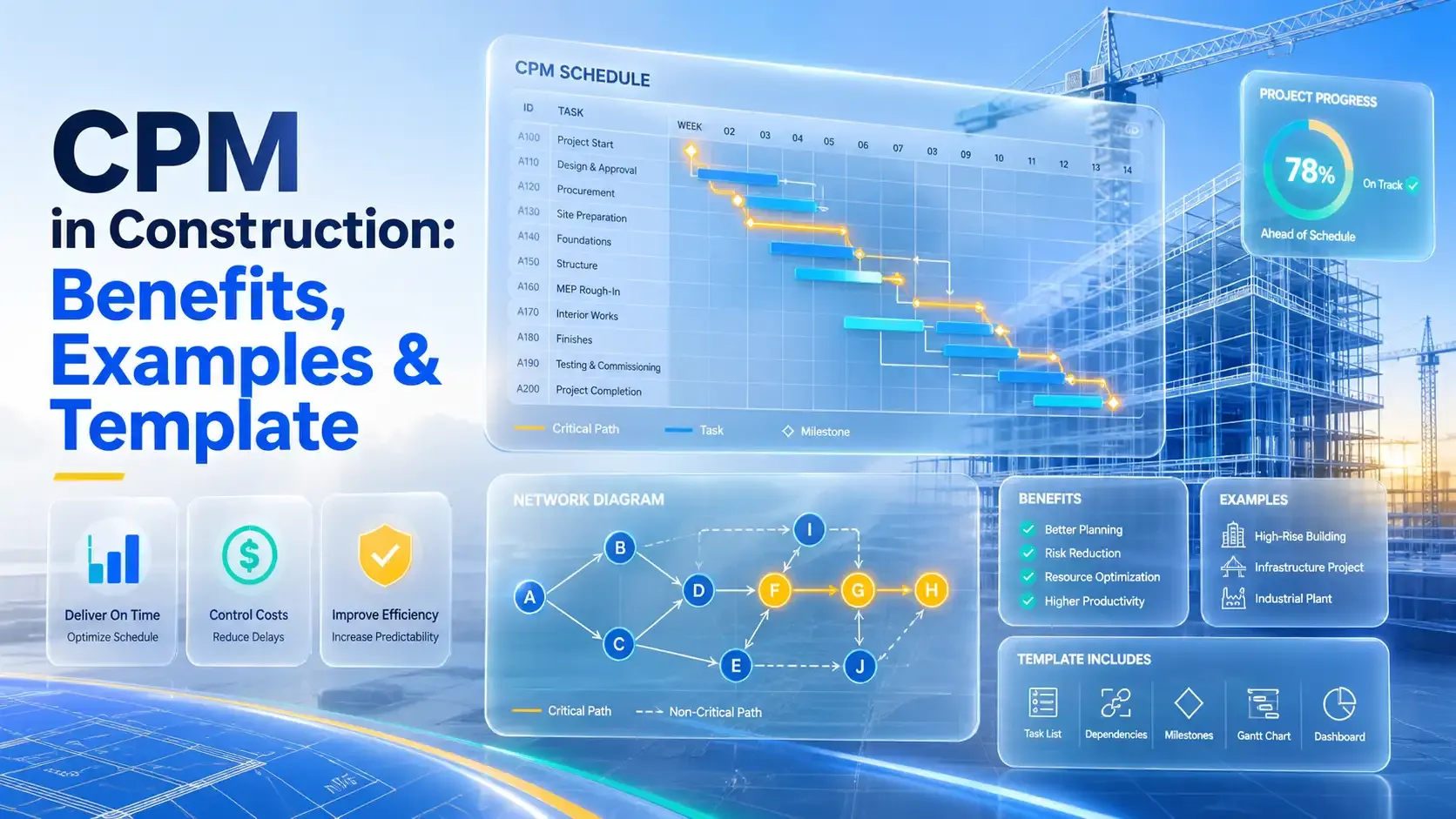
The critical path method is a construction scheduling method that finds the order and timing of tasks to show the earliest possible completion date. It builds a network of tasks linked by real dependencies and then identifies the longest chain of linked tasks. Thus, it becomes the critical path that determines the project’s minimum duration.
In simple terms, CPM tells you which tasks directly control the project end date. If a task on this path slips, the entire project's finish date slips equally because there is no slack left.
According to research, 58% of respondents said CPM improved scheduling and planning.
Here’s how it works.
List all tasks, record how long each takes, and then link them by dependency logic (like “Task B cannot start until Task A finishes”). The software then calculates the earliest and latest possible start and finish times for each task.
Tasks on the critical path have zero float, meaning no room for delay without affecting the end date.
Pros:
- Shows the earliest possible finish date with clear logic.
- Highlights bottlenecks before they cause real delays.
- Supports contract planning and risk control.
Cons:
- Can be too rigid when daily field changes occur.
- Does not include resource limits unless you add extra work.
Track task dependencies and project milestones easily.
Monitor the critical path and ensure deadlines are met efficiently.
Gantt Charts
Focus: Visualizing timelines, tasks, and progress
Best For: Small to medium projects and stakeholder communication
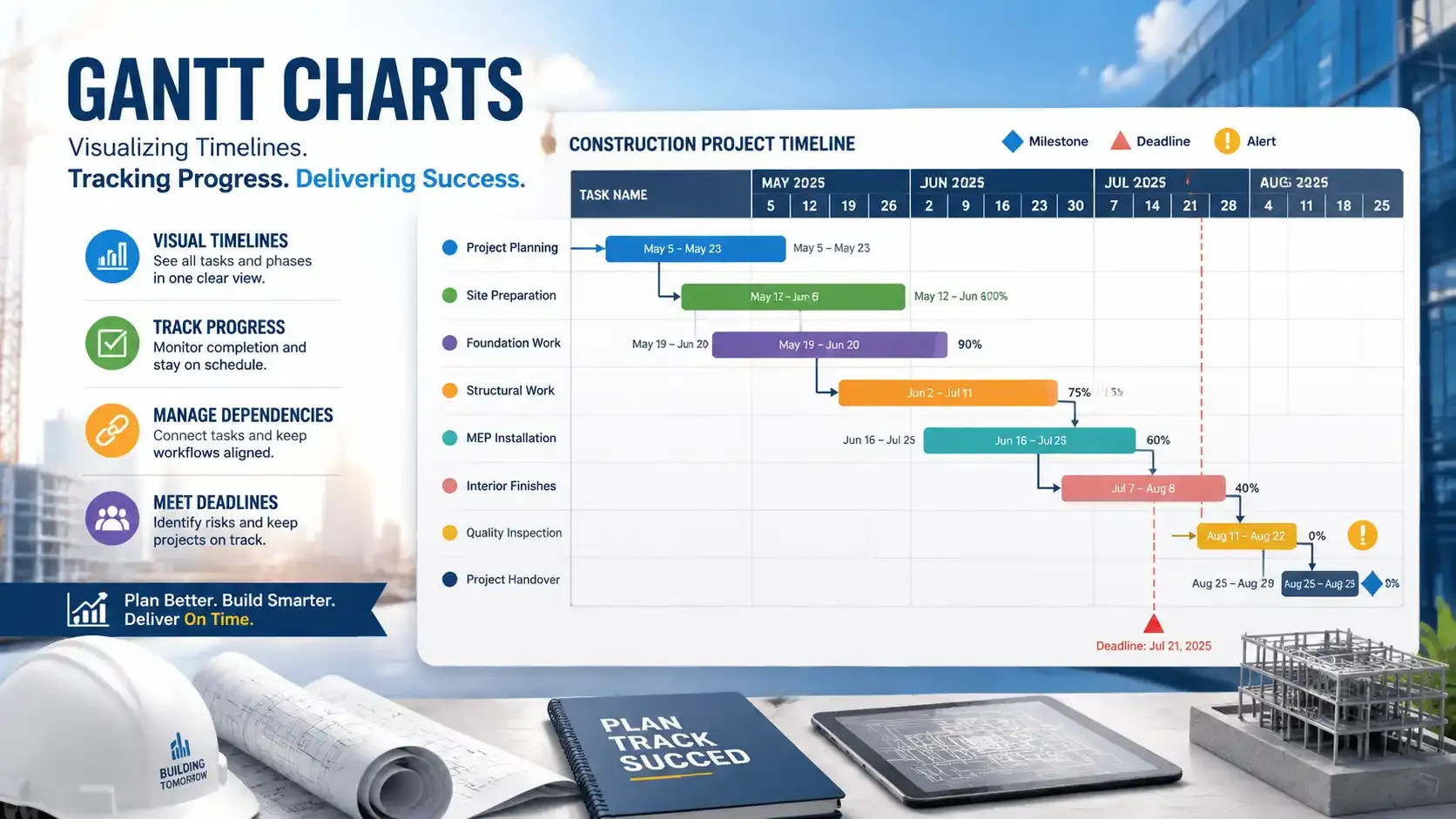
A Gantt chart is a project visualization tool that shows tasks on a timeline using horizontal bars so teams can track work and progress over time. Each bar shows a task’s start date, end date, and completion status, making planning easier and clearer for everyone involved.
According to Forbes, Gantt charts provide visual project overviews, show task dependencies and timelines, and help identify bottlenecks.
Gantt charts convert a list of tasks into a visual timeline that anyone can interpret quickly. Teams in construction use them to align deadlines, assign responsibilities, and ensure stakeholders understand the project sequence.
Here’s how it works: after listing all tasks with start and end dates, a project manager places them on the timeline as horizontal bars. Modern software can link these bars to show dependencies, but Gantt charts are mainly reporting and progress-tracking tools, not deep schedule analysis systems.
Pros:
- Easy to interpret visually, even for non-technical stakeholders.
- Shows task progress and deadlines in one view.
- Helps managers track multiple tasks and phases simultaneously.
- Identifies potential scheduling conflicts early.
Cons:
- Does not inherently show dependencies without CPM integration.
- Cannot manage resource constraints or complex project logic alone.
- Large projects can clutter the chart, reducing readability.
Visualize timelines and see progress at a glance
Keep teams aligned and track project phases effortlessly.
Last Planner System (LPS)
.webp?2026-05-12T04%3A13%3A33.850Z=&w=3840&q=100)
Focus: Collaborative, team-driven workflow planning
Best For: Projects needing high reliability, waste reduction, and crew-level coordination
The Last Planner System (LPS) is a pull-based planning method that ensures work is ready and predictable before crews start it. Planning shifts to team members who perform the work and know the site realities. This involvement reduces delays, miscommunication, and wasted effort.
LPS begins with master planning, defining the project’s milestones. Then it breaks work into phases with clear sequences.
Lookahead planning identifies constraints before tasks start, and weekly work plans turn phases into short-term commitments. Daily coordination meetings keep everyone aligned, and Percent Plan Complete (PPC) tracks how reliably teams meet weekly promises.
Pull planning is key. Teams work backward from a milestone to outline the tasks needed to reach it. Trades provide input on duration, dependencies, and resources.
This creates a smooth workflow between teams and prevents bottlenecks. Digital tools now capture pull plans in real time, keeping schedules visible for all stakeholders.
LPS increases reliability because work is only committed when all conditions are met. According to research, 75% reported improved planning and quality outcomes.
Pros:
- Improves PPC and schedule reliability.
- Encourages accountability among trade partners.
- Reduces rework and delays.
- Enhances collaboration and communication on-site.
- Identifies constraints early for proactive problem-solving.
Cons:
- Requires strong commitment and culture change.
- Needs active participation from all team members.
- Relies on accurate input from crews.
- Implementation is challenging without leadership support and training
Improve workflow reliability and crew coordination.
Manage weekly commitments and reduce rework efficiently.
CPM vs Gantt vs Last Planner: Key Differences Explained
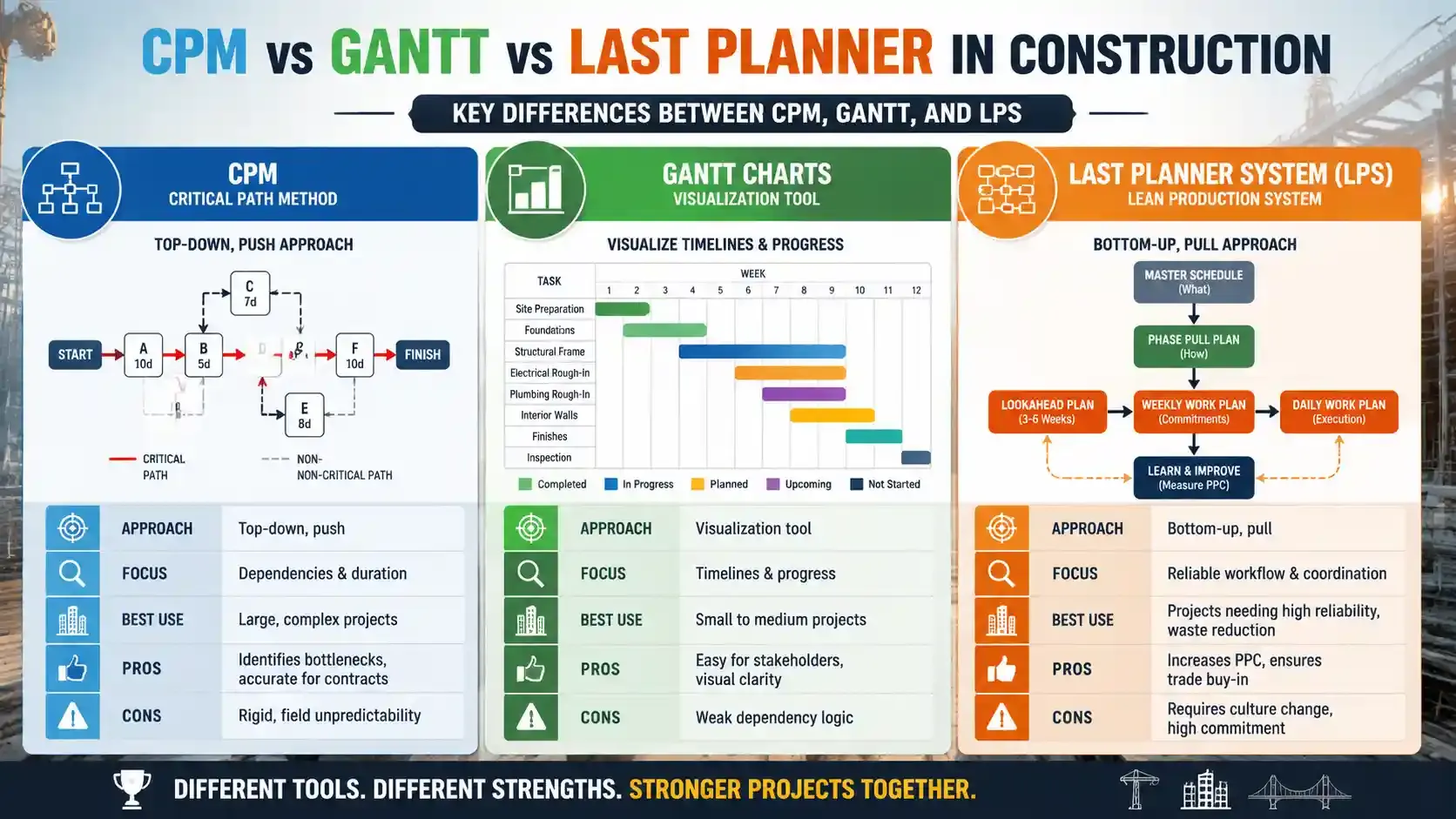
| Approach | Top‑down, push | Visualization tool | Bottom‑up, pull |
|---|---|---|---|
Focus | Dependencies & duration | Timelines & progress | Reliable workflow & coordination |
Best Use | Large, complex projects | Small to medium projects | Projects needing high reliability, waste reduction |
Pros | Identifies bottlenecks, accurate for contracts | Easy for stakeholders, visual clarity | Increases PPC, ensures trade buy‑in |
Cons | Rigid, field unpredictability | Weak dependency logic | Requires culture change, high commitment |
Approach
CPM follows a top-down, push method, meaning planners define the full schedule first and push tasks to the team. LPS, however, uses a bottom-up, pull approach.
Whereas Gantt charts don’t dictate the method. They visualize whatever schedule you have, whether CPM-based or manual.
Focus
CPM focuses on dependencies and duration, helping managers identify critical tasks that control the overall timeline. LPS focuses on workflow reliability and team coordination, ensuring that daily and weekly job commitments are achievable. Gantt charts focus on timelines and progress, giving a clear visual of when tasks start, end, and overlap.
Best Use
CPM is best for large, complex projects where understanding the critical path is crucial, such as high-rise buildings or highway construction. Gantt charts are best for small to medium projects or situations where stakeholders need a quick visual of task progress. LPS is best for projects that require high reliability, reduce waste, and need crew-level coordination.
Pros
CPM’s advantage is that it identifies bottlenecks and provides accurate schedules for contracts. Gantt charts are easy for stakeholders to understand and give visual clarity on project timelines. LPS increases Percent Plan Complete (PPC) and ensures trade partners are committed to completing their work on time.
Cons
CPM can be rigid, struggling with daily unpredictability in the field. Gantt charts have weak dependency logic and cannot analyze task relationships on their own. LPS requires culture change and high commitment from all team members, and its success depends on accurate input from the crew.
Compare scheduling methods to choose what fits your project.
Understand which method works best for complexity, size, and team needs.
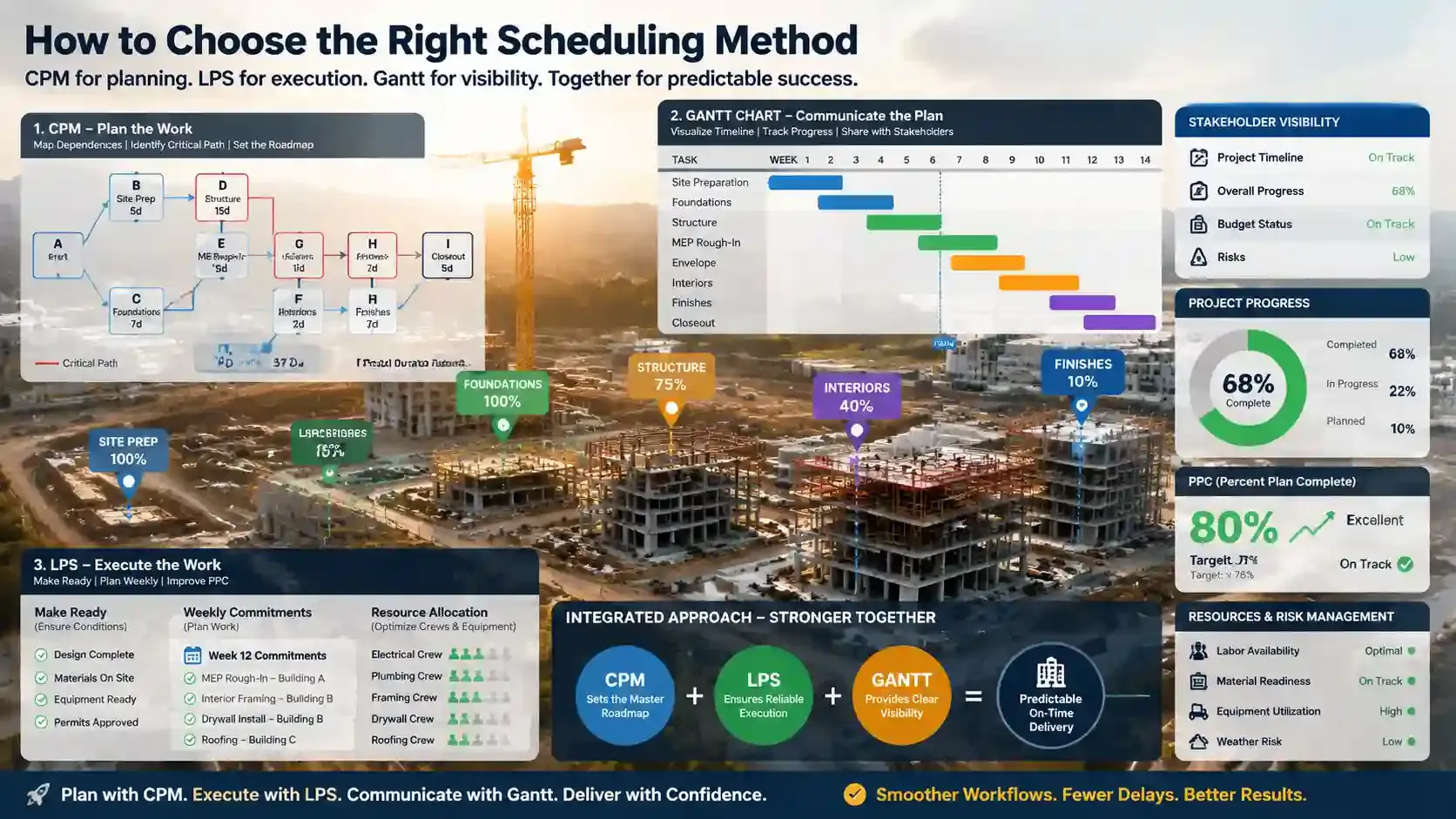
Selecting a scheduling method depends on the project’s size, complexity, team structure, and communication needs:
Assess Project Complexity
Large, multi-phase projects need CPM to map task dependencies and LPS to guarantee execution reliability. CPM identifies which tasks control the project duration, while LPS ensures the crews can actually complete the work weekly.
Smaller projects, however, often work well with Gantt charts alone. They provide a clear visual of start and end dates, making it easy for teams and stakeholders to follow progress without complex calculations.
Evaluate Team Coordination Needs
When your project involves many trades and daily adjustments, LPS is the best choice. It engages field crews in planning, ensures tasks are ready to execute, and improves Percent Plan Complete (PPC). On projects in 2024, crews using LPS raised PPC from 50% to over 80%, drastically reducing rework and idle time.
If the project is mostly top-down, with managers controlling schedules and minimal daily coordination, CPM alone can be sufficient. CPM provides structure and highlights critical tasks, giving managers a clear roadmap for sequencing and deadlines.
Consider Stakeholder Communication
Projects with high stakeholder visibility need to benefit from Gantt charts. They show timelines, overlapping tasks, and overall project progress in a simple visual format.
CPM and LPS handle internal logic and execution reliability but do not communicate progress as clearly to non-technical stakeholders. Using Gantt charts alongside CPM and LPS bridges this gap.
Factor in Resources and Risk
Projects with limited labor, material variability, or uncertain conditions require LPS. Its pull-based planning ensures tasks are ready before crews start, reducing wasted effort and downtime.
CPM is useful for strict scheduling and contract compliance, but assumes task durations are accurate. LPS adds flexibility while keeping the schedule reliable in unpredictable conditions.
Integrate Methods Strategically
The strongest approach combines all three tools.
CPM sets the master roadmap, identifying the critical path and overall timing. LPS ensures daily and weekly commitments are realistic and achievable, while Gantt charts provide a visual dashboard for stakeholders.
This integration balances long-term planning, field reliability, and communication clarity, resulting in smoother, more predictable project delivery.
For construction teams, having real-time visibility and organized scheduling can make integrating CPM, Gantt, and LPS much easier. FieldServicely allows managers to track crews, assign jobs, and monitor progress from a single dashboard.
This ensures that daily plans are executed reliably, resources are optimized, and adjustments can be made instantly when delays or changes occur.
Make informed decisions based on project requirements.
Learn which method balances planning, visibility, and execution.
Best Practices for Implementation
- Use CPM for the master schedule, LPS for field execution, and Gantt charts for progress visibility.
- Track planned versus actual progress continuously and adjust schedules as needed.
- Allocate resources carefully, considering crew availability, equipment, and material delivery.
- Incorporate lookahead planning, contingency buffers, or PERT to mitigate risks.
- Train teams and foster a culture where everyone understands their role in LPS for high PPC.
- Implement visual tools like dashboards or Kanban boards to keep workflow transparent and trackable.
No single scheduling method works for every project. CPM delivers precise sequencing and highlights critical tasks. Gantt charts provide a clear visual of timelines and progress for teams and stakeholders. LPS ensures work is feasible, reliable, and coordinated on the ground. By understanding these differences and combining methods where needed, project managers can minimize delays, use resources efficiently, and improve communication.
Frequently Asked Questions
How do CPM, Gantt, and LPS affect construction cost control?
CPM reduces cost overruns by highlighting critical tasks that can delay the project. Gantt charts track budget timelines visually, while LPS cuts costs by reducing rework and improving crew reliability.
Can small construction teams benefit from LPS?
Even small teams gain from LPS because it improves weekly workflow commitments and team coordination. It boosts task reliability even if the project does not use complex CPM logic.
Do modern software tools combine CPM, Gantt, and LPS features?
Many project platforms now integrate task logic (CPM), timeline bars (Gantt), and collaborative planning dashboards (LPS). This lets teams plan, visualize, and execute without switching between tools.
How does real-time data improve these scheduling methods?
LPS handles daily and weekly changes better because crews commit only to work that is ready and feasible. CPM focuses on overall logic and deadlines, so LPS adds agility when plans change on site.
What to read next
.webp?2026-04-24T06%3A07%3A09.841Z=&w=3840&q=100)
Scheduling and Dispatch
